


Contents
Adoption – Who Uses Lua?
While Lua is not popular in the mainstream programming world, it can be found in many applications. Adobe Photoshop Lightroom is one of them.
Lua is also applied extensively in video games, with Angry Birds, being one. Popular flight simulator X-Plane uses Lua for its aircraft systems and plugins.
The mobile payment app Venmo, for example, was built using Lua. The programming language was also used in the development of CISCO Systems alongside other networking applications.
Chapter 1: Setting up your environment
In order to write and compile Lua, we need to set up an environment to do so.
While there are a host of development tools available for use, we will choose the option of installing an IDE to get us up and running in no time.
1.1 Installing an IDE for Lua.
The platform-independent ZeroBrane Studio is an ideal choice for today’s exercise. The lightweight IDE is available for free and easy to install.
Head over to the official website to download a suitable version for your workstation.
After installation, we shall need an API token to authenticate all our requests to the endpoint of our Football API.
1.2 Obtaining an API Token
To use the API, sign up for an account. Your account automatically comes with the Danish Super Liga and Scottish Premier League, these are free plans with no costs.
Head over to the create an API Token section.
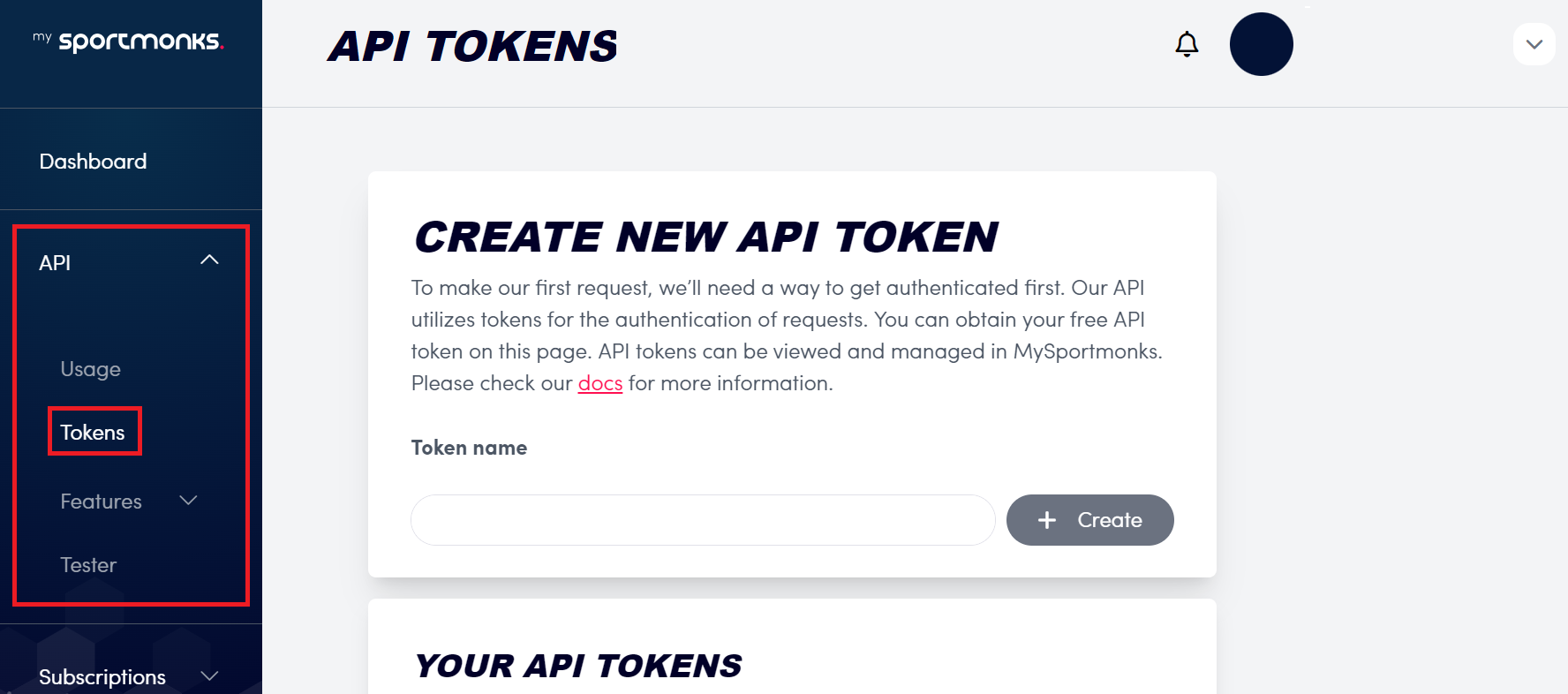
Once you have your API Token, which is required for authentication and accessing the data endpoints, you must keep it private.
Chapter 2 Making Your First API Call
For today’s exercise, we will use the Match Day 1 clash between Juventus and recently promoted Como which ended in a 3-0 win for the Old Lady. That game left Juventus as the club to have won the most games on Match Day 1 in Serie A [60] history.
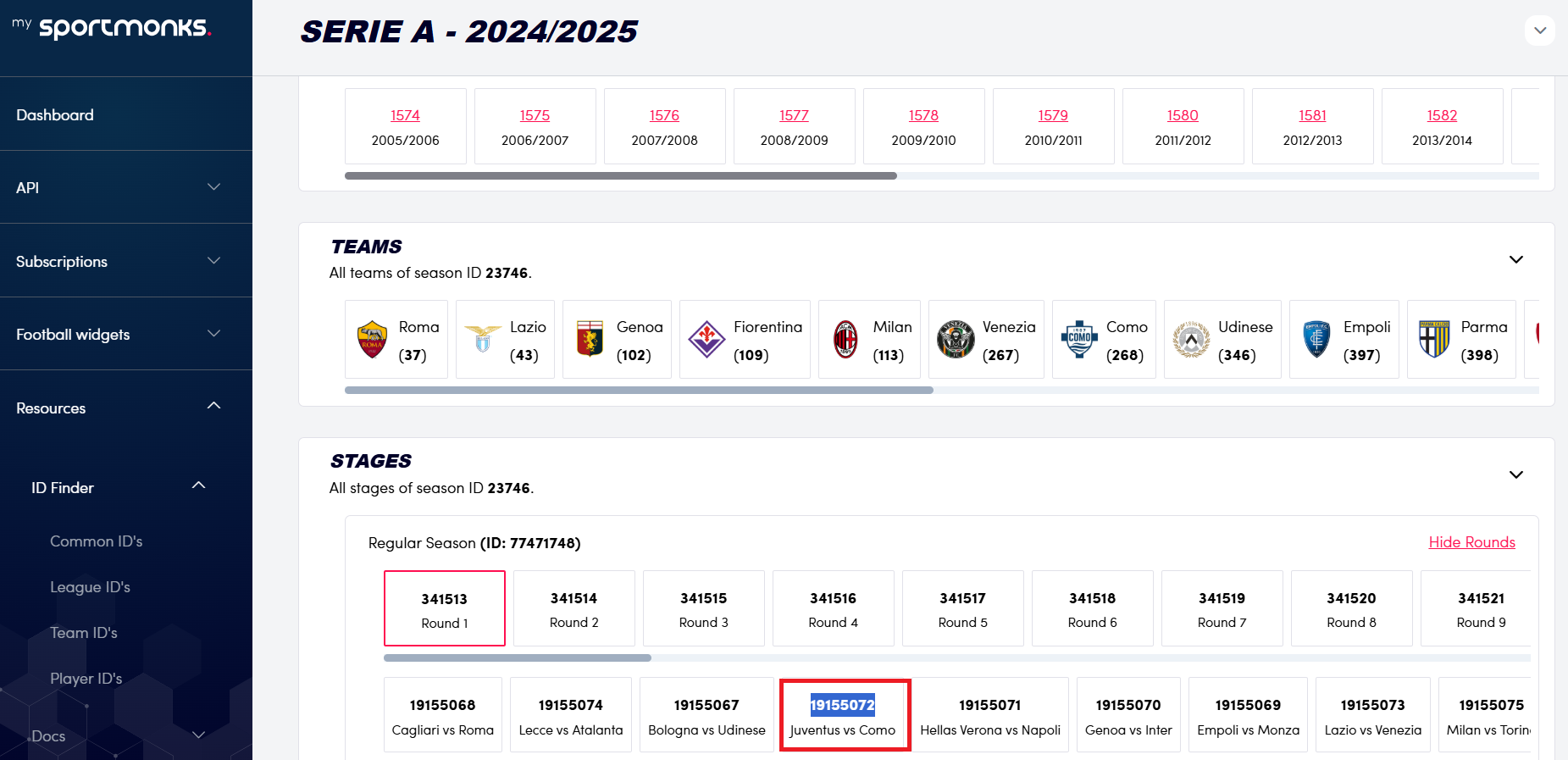
Head over to the ID Finder where you will obtain the ID value of 19155072 which we shall need for our url of interest.
2.1 Getting Fixture Details.
We will retrieve the details for this fixture using Lua and the complete URI below which you can test out on your browser.
https://api.sportmonks.com/v3/football/fixtures/{ID}?api_token=YOUR_TOKEN
local http = require("socket.http")

local ltn12 = require("ltn12") -- Needed for response storage

function fetchFixtureData(fixtureId)

    local baseUrl = "https://api.sportmonks.com/v3/football/fixtures"

    local apiToken = "API Token"

    local apiUrl = string.format("%s/%s?api_token=%s", baseUrl, fixtureId, apiToken)

    -- Prepare a response table

    local response = {}

    local _, statusCode = http.request{

        url = apiUrl,

        sink = ltn12.sink.table(response) -- Capture the response body

    }

    -- Check the status code and print the result

    if statusCode == 200 then

        print("Response: " .. table.concat(response))

    else

        print("Failed with status: " .. tostring(statusCode))

    end

end
-- Call the function with a specific fixture ID

fetchFixtureData("19155150")
Response: {"data":{"id":19155150,"sport_id":1,"league_id":384,"season_id":23746,"stage_id":77471748,"group_id":null,"aggregate_id":null,"round_id":341521,"state_id":5,"venue_id":1721,"name":"Inter vs Juventus","starting_at":"2024-10-27 17:00:00","result_info":"Game ended in draw.","leg":"1/1","details":null,"length":90,"placeholder":false,"has_odds":true,"has_premium_odds":true,"starting_at_timestamp":1730048400},"subscription":[{"meta":{"trial_ends_at":"2024-10-16 14:50:45","ends_at":null,"current_timestamp":1736507811},"plans":[{"plan":"Enterprise plan (loyal)","sport":"Football","category":"Advanced"},{"plan":"Enterprise Plan","sport":"Cricket","category":"Standard"},{"plan":"Formula One","sport":"Formula One","category":"Standard"}],"add_ons":[{"add_on":"All-in News API","sport":"Football","category":"News"},{"add_on":"pressure index add-on","sport":"Football","category":"Default"},{"add_on":"Enterprise Plan Predictions","sport":"Football","category":"Predictions"},{"add_on":"xG Advanced","sport":"Football","category":"Expected"}],"widgets":[{"widget":"Sportmonks Widgets","sport":"Football"}]}],"rate_limit":{"resets_in_seconds":3573,"remaining":2998,"requested_entity":"Fixture"},"timezone":"UTC"}
Explanation
The socket.http is a library for making HTTP requests in Lua, while the statement ltn12: Provides utilities for handling streams and storing response data in Lua tables.
We then created a function fetchFixtureData that accepts one parameter: fixtureId, representing the unique ID of a football fixture.
A statement to construct the url using the Base URL which is the main API endpoint and a token for authentication is then made to dynamically construct our url of interest.
We then check the response, and if the response is code 200 [OK] then it indicates that the request was successful.
The statement table.concat(response) combines all parts of the response table into a single string for easy printing.
If the request fails, the script prints the HTTP status code which you can cross reference with error codes from our documentation. However, there is a drawback. The response is difficult to read. We will fix this in the next section.
2.2 Pretty Print Fixture Details.
You must have heard of the term pretty print while working with an API that returns a JSON response. We shall modify the earlier piece of code to print the JSON response in a much more readable format without the use of an external library.
local http = require("socket.http")
local ltn12 = require("ltn12")

-- Pretty-print function for JSON strings
local function prettyPrintJSON(jsonString, indentSize)
    indentSize = indentSize or 2
    local indent = string.rep(" ", indentSize) -- Create indentation
    local level = 0
    local prettyJSON = ""

    for i = 1, #jsonString do
        local char = jsonString:sub(i, i)

        if char == "{" or char == "[" then
            prettyJSON = prettyJSON .. char .. "n" .. string.rep(indent, level + 1)
            level = level + 1
        elseif char == "}" or char == "]" then
            level = level - 1
            prettyJSON = prettyJSON .. "n" .. string.rep(indent, level) .. char
        elseif char == "," then
            prettyJSON = prettyJSON .. char .. "n" .. string.rep(indent, level)
        else
            prettyJSON = prettyJSON .. char
        end
    end

    return prettyJSON
end

-- Function to fetch and pretty-print fixture data
function fetchFixtureData(fixtureId)
    local baseUrl = "https://api.sportmonks.com/v3/football/fixtures"
    local apiToken = "API_Token"
    local apiUrl = string.format("%s/%s?api_token=%s", baseUrl, fixtureId, apiToken)

    local response = {}
    local _, statusCode = http.request{
        url = apiUrl,
        sink = ltn12.sink.table(response)
    }

    if statusCode == 200 then
        local rawJson = table.concat(response)
        print("Pretty-Printed JSON Response:")
        print(prettyPrintJSON(rawJson))
    else
        print("Failed with status: " .. tostring(statusCode))
    end
end

-- Call the function with a specific fixture ID
fetchFixtureData("19155072")
Pretty-Printed JSON Response:
    {
  "data":{
    "id":19155072,
    "sport_id":1,
    "league_id":384,
    "season_id":23746,
    "stage_id":77471748,
    "group_id":null,
    "aggregate_id":null,
    "round_id":341513,
    "state_id":5,
    "venue_id":118500,
    "name":"Juventus vs Como",
    "starting_at":"2024-08-19 18:45:00",
    "result_info":"Juventus won after full-time.",
    "leg":"1/1",
    "details":null,
    "length":90,
    "placeholder":false,
    "has_odds":true,
    "has_premium_odds":true,
    "starting_at_timestamp":1724093100
  },
  "subscription":[
    {
      "meta":{
        "trial_ends_at":"2024-10-16 14:50:45",
        "ends_at":null,
        "current_timestamp":1734917581
      },
      "plans":[
        {
          "plan":"Enterprise plan (loyal)",
          "sport":"Football",
          "category":"Advanced"
        },
        {
          "plan":"Enterprise Plan",
          "sport":"Cricket",
          "category":"Standard"
        },
        {
          "plan":"Formula One",
          "sport":"Formula One",
          "category":"Standard"
        }
      ],
      "add_ons":[
        {
          "add_on":"All-in News API",
          "sport":"Football",
          "category":"News"
        },
        {
          "add_on":"pressure index add-on",
          "sport":"Football",
          "category":"Default"
        },
        {
          "add_on":"Enterprise Plan Predictions",
          "sport":"Football",
          "category":"Predictions"
        },
        {
          "add_on":"xG Advanced",
          "sport":"Football",
          "category":"Expected"
        }
      ],
      "widgets":[
        {
          "widget":"Sportmonks Widgets",
          "sport":"Football"
        }
      ]
    }
  ],
  "rate_limit":{
    "resets_in_seconds":3600,
    "remaining":2999,
    "requested_entity":"Fixture"
  },
  "timezone":"UTC"
}
As you can see, we have a more readable format; we shall move on to the next section, where we will retrieve predictions from our fixture of interest, Juventus vs. Como.
2.3. Get Predictions by Fixture ID
While not all fixtures contain sufficient data for reliable predictions, you can enrich your applications with our prediction API, which employs machine learning techniques and models for detailed predictions that include scores, over/under, and both teams to score (BTTS).
We shall focus on predictions for scores in this blog. You may visit the documentation page to learn more about our prediction API.
Here is our URL of interest, which you can try out on your browser.
local http = require("socket.http")
local ltn12 = require("ltn12")

-- Pretty-print function for JSON strings
local function prettyPrintJSON(jsonString, indentSize)
    indentSize = indentSize or 2
    local indent = string.rep(" ", indentSize) -- Create indentation
    local level = 0
    local prettyJSON = ""

    for i = 1, #jsonString do
        local char = jsonString:sub(i, i)

        if char == "{" or char == "[" then
            prettyJSON = prettyJSON .. char .. "n" .. string.rep(indent, level + 1)
            level = level + 1
        elseif char == "}" or char == "]" then
            level = level - 1
            prettyJSON = prettyJSON .. "n" .. string.rep(indent, level) .. char
        elseif char == "," then
            prettyJSON = prettyJSON .. char .. "n" .. string.rep(indent, level)
        else
            prettyJSON = prettyJSON .. char
        end
    end

    return prettyJSON
end

-- Function to fetch and pretty-print fixture data
function fetchFixtureData(fixtureId)
    local baseUrl = "https://api.sportmonks.com/v3/football/predictions/probabilities/fixtures"
    local apiToken = "API_Token"
    local apiUrl = string.format("%s/%s?api_token=%s", baseUrl, fixtureId, apiToken)

    local response = {}
    local _, statusCode = http.request{
        url = apiUrl,
        sink = ltn12.sink.table(response)
    }

    if statusCode == 200 then
        local rawJson = table.concat(response)
        print("Pretty-Printed JSON Response:")
        print(prettyPrintJSON(rawJson))
    else
        print("Failed with status: " .. tostring(statusCode))
    end
end

-- Call the function with a specific fixture ID
fetchFixtureData("19155072")
Pretty-Printed JSON Response:
    {
  "data":[
    {
      "id":14610512,
      "fixture_id":19155072,
      "predictions":{
        "yes":70.69,
        "no":18.78,
        "equal":10.54
      },
      "type_id":1686
    },
    {
      "id":14610513,
      "fixture_id":19155072,
      "predictions":{
        "yes":10.24,
        "no":89.76
      },
      "type_id":1679
    },
    {
      "id":14610514,
      "fixture_id":19155072,
      "predictions":{
        "yes":94.83,
        "no":2.07,
        "equal":3.1
      },
      "type_id":1690
    },
    {
      "id":14610516,
      "fixture_id":19155072,
      "predictions":{
        "yes":46.2,
        "no":41.38,
        "equal":12.42
      },
      "type_id":1687
    },
    {
      "id":14610517,
      "fixture_id":19155072,
      "predictions":{
        "yes":89.36,
        "no":5.17,
        "equal":5.46
      },
      "type_id":1683
    },
    {
      "id":14610518,
      "fixture_id":19155072,
      "predictions":{
        "yes":58.62,
        "no":29.31,
        "equal":12.07
      },
      "type_id":1689
    },
    {
      "id":14610519,
      "fixture_id":19155072,
      "predictions":{
        "yes":81.22,
        "no":10.64,
        "equal":8.14
      },
      "type_id":1685
    },
    {
      "id":14610520,
      "fixture_id":19155072,
      "predictions":{
        "yes":34.57,
        "no":53.8,
        "equal":11.63
      },
      "type_id":1688
    },
    {
      "id":14610521,
      "fixture_id":19155072,
      "predictions":{
        "yes":24.58,
        "no":65.43,
        "equal":9.99
      },
      "type_id":1684
    },
    {
      "id":14610522,
      "fixture_id":19155072,
      "predictions":{
        "yes":21.54,
        "no":78.46
      },
      "type_id":332
    },
    {
      "id":14610523,
      "fixture_id":19155072,
      "predictions":{
        "yes":34.57,
        "no":65.43,
        "equal":null
      },
      "type_id":1585
    },
    {
      "id":14610524,
      "fixture_id":19155072,
      "predictions":{
        "yes":39.06,
        "no":60.94
      },
      "type_id":331
    },
    {
      "id":14610525,
      "fixture_id":19155072,
      "predictions":{
        "yes":56.75,
        "no":43.25
      },
      "type_id":333
    },
    {
      "id":14610526,
      "fixture_id":19155072,
      "predictions":{
        "yes":15.52,
        "no":84.48
      },
      "type_id":330
    },
    {
      "id":14610527,
      "fixture_id":19155072,
      "predictions":{
        "yes":5.89,
        "no":94.11
      },
      "type_id":328
    },
    {
      "id":14610528,
      "fixture_id":19155072,
      "predictions":{
        "yes":73.39,
        "no":26.61
      },
      "type_id":334
    },
    {
      "id":14610529,
      "fixture_id":19155072,
      "predictions":{
        "yes":1.48,
        "no":98.52
      },
      "type_id":327
    },
    {
      "id":14610530,
      "fixture_id":19155072,
      "predictions":{
        "yes":19.73,
        "no":80.27
      },
      "type_id":236
    },
    {
      "id":14610531,
      "fixture_id":19155072,
      "predictions":{
        "scores":{
          "0-0":10.75,
          "0-1":9.08,
          "0-2":4.24,
          "0-3":1.08,
          "1-0":14.12,
          "1-1":13.11,
          "1-2":5.48,
          "1-3":1.62,
          "2-0":9.33,
          "2-1":9.07,
          "2-2":3.94,
          "2-3":1.2,
          "3-0":4,
          "3-1":3.95,
          "3-2":1.99,
          "3-3":0.51,
          "Other_1":5.06,
          "Other_2":1.47,
          "Other_X":0.01
        }
      },
      "type_id":240
    },
    {
      "id":14610532,
      "fixture_id":19155072,
      "predictions":{
        "yes":5.07,
        "no":94.93
      },
      "type_id":326
    },
    {
      "id":14610533,
      "fixture_id":19155072,
      "predictions":{
        "yes":39.37,
        "no":60.63
      },
      "type_id":235
    },
    {
      "id":14610534,
      "fixture_id":19155072,
      "predictions":{
        "yes":66.06,
        "no":33.94
      },
      "type_id":234
    },
    {
      "id":14610535,
      "fixture_id":19155072,
      "predictions":{
        "home":32.22,
        "away":22.82,
        "draw":44.97
      },
      "type_id":233
    },
    {
      "id":14610536,
      "fixture_id":19155072,
      "predictions":{
        "home_home":25.67,
        "home_away":1.86,
        "home_draw":5.43,
        "away_home":2.5,
        "away_away":14.57,
        "away_draw":5.28,
        "draw_draw":18.72,
        "draw_home":17.19,
        "draw_away":8.78
      },
      "type_id":232
    },
    {
      "id":14610537,
      "fixture_id":19155072,
      "predictions":{
        "draw_home":75.82000000000001,
        "draw_away":52.480000000000004,
        "home_away":71.7
      },
      "type_id":239
    }
  ],
  "pagination":{
    "count":25,
    "per_page":25,
    "current_page":1,
    "next_page":"https://api.sportmonks.com/v3/football/predictions/probabilities/fixtures/19155072?page=2",
    "has_more":true
  },
  "subscription":[
    {
      "meta":{
        "trial_ends_at":"2024-10-16 14:50:45",
        "ends_at":null,
        "current_timestamp":1734983903
      },
      "plans":[
        {
          "plan":"Enterprise plan (loyal)",
          "sport":"Football",
          "category":"Advanced"
        },
        {
          "plan":"Enterprise Plan",
          "sport":"Cricket",
          "category":"Standard"
        },
        {
          "plan":"Formula One",
          "sport":"Formula One",
          "category":"Standard"
        }
      ],
      "add_ons":[
        {
          "add_on":"All-in News API",
          "sport":"Football",
          "category":"News"
        },
        {
          "add_on":"pressure index add-on",
          "sport":"Football",
          "category":"Default"
        },
        {
          "add_on":"Enterprise Plan Predictions",
          "sport":"Football",
          "category":"Predictions"
        },
        {
          "add_on":"xG Advanced",
          "sport":"Football",
          "category":"Expected"
        }
      ],
      "widgets":[
        {
          "widget":"Sportmonks Widgets",
          "sport":"Football"
        }
      ]
    }
  ],
  "rate_limit":{
    "resets_in_seconds":2803,
    "remaining":2997,
    "requested_entity":"Prediction"
  },
  "timezone":"UTC"
}
A brief explanation of the response can be found on our documentation page.
Chapter 3. Create a Horizontal Bar Chart Using Predictions.
Now that we have our predictions pretty printed, we can now create a bar chart using the scores and probabilities while ignoring the other details from the JSON response. Without the use of any external library, we will create a text-based bar chart.
-- Function to calculate proportions and create a text-based bar chart
function drawTextBarChart(predictions)
    local total = 0
    for _, prediction in ipairs(predictions) do
        total = total + prediction.value
    end

    -- Generate bar chart segments
    print("Text-Based Bar Chart for Predictions")
    for _, prediction in ipairs(predictions) do
        local proportion = math.floor((prediction.value / total) * 50) -- Scale to 50 blocks
        print(string.format("%-10s: %s (%.2f%%)", prediction.name, string.rep(("226150136"), proportion), (prediction.value / total) * 100))
    end
end

-- Function to parse JSON string manually (very basic parsing, only works for simple flat structures)
function simpleJSONParse(jsonString)
    local parsed = {}
    -- Remove curly braces and spaces around key-value pairs
    jsonString = jsonString:match("^%s*(.*)%s*$")
    jsonString = jsonString:sub(2, -2)  -- Remove curly braces
    -- Split the string into key-value pairs
    for key, value in jsonString:gmatch('"([^"]+)":%s*([^,}]+)') do
        -- Try to convert number values
        value = tonumber(value) or value
        parsed[key] = value
    end
    return parsed
end

-- Function to fetch data from API and extract scores for the bar chart
function fetchFixtureData(fixtureId)
    local baseUrl = "https://api.sportmonks.com/v3/football/predictions/probabilities/fixtures"
    local apiToken = "API_Token"  -- Replace with your actual API token
    local apiUrl = string.format("%s/%s?api_token=%s", baseUrl, fixtureId, apiToken)

    local http = require("socket.http")
    local ltn12 = require("ltn12")

    local response = {}
    local _, statusCode = http.request{
        url = apiUrl,
        sink = ltn12.sink.table(response)
    }

    if statusCode == 200 then
        local rawJson = table.concat(response)

        -- Check if "scores" is present in the JSON response
        local scoresStart, scoresEnd = rawJson:find('"scores":%{')
        if scoresStart then
            -- Extract the "scores" part of the JSON response
            local scoresJson = rawJson:sub(scoresStart + 9, rawJson:find("}", scoresStart) - 1)
            -- Parse the scores into a table
            local predictionScores = simpleJSONParse("{" .. scoresJson .. "}")
            local predictions = {}

            -- Convert the scores into a table for the bar chart
            for score, value in pairs(predictionScores) do
                table.insert(predictions, {name = score, value = value})
            end

            -- Call the function to draw the text-based bar chart
            drawTextBarChart(predictions)
        else
            print("Error: 'scores' data not found in the response.")
        end
    else
        print("Failed to fetch data with status: " .. tostring(statusCode))
    end
end

-- Call the function with a specific fixture ID
fetchFixtureData("19155072")
Text-Based Bar Chart for Predictions:
3-3       :  (0.51%)
2-3       :  (1.20%)
Other_2   :  (1.47%)
0-1       : ████ (9.08%)
0-0       : █████ (10.75%)
3-0       : █ (4.00%)
2-2       : █ (3.94%)
1-2       : ██ (5.48%)
3-2       :  (1.99%)
1-0       : ███████ (14.12%)
Other_X   :  (0.01%)
Other_1   : ██ (5.06%)
3-1       : █ (3.95%)
1-3       :  (1.62%)
0-2       : ██ (4.24%)
2-0       : ████ (9.33%)
2-1       : ████ (9.07%)
1-1       : ██████ (13.11%)
0-3       :  (1.08%)
As we can see, the results include undefined predictions for scores that have been represented as Others. It is also noticeable that values below 2% are not being properly represented on our bar chart.
We shall fix this in the next section.
Chapter 3.1 Refine the Bar Chart
By increasing the scale to 100 blocks for finer granularity, we shall ensure a minimum of one block is displayed for very small percentages. This will ensure all predictions are graphically represented by text.
We shall also make our results more readable by including an empty line between each bar chart for better readability. In addition, we will remove all values that begin with ‘Others.’
-- Function to calculate proportions and create a text-based bar chart


function drawTextBarChart(predictions)
    local total = 0
    for _, prediction in ipairs(predictions) do
        total = total + prediction.value
    end

    -- Adjust the scale to accommodate small percentages (e.g., scale to 100 blocks)
    local scale = 100 -- Increase the scale to allow finer granularity

    -- Generate bar chart segments
    print("Text-Based Bar Chart for Predictions:")
    for _, prediction in ipairs(predictions) do
        local proportion = math.floor((prediction.value / total) * scale) -- Scale to more blocks
        proportion = math.max(proportion, 1) -- Ensure at least one block is displayed
        print(string.format("%-10s: %s (%.2f%%)", prediction.name, string.rep(("226150136"), proportion), (prediction.value / total) * 100))
        print() -- Add a blank line after each bar for spacing
    end
end

-- Function to parse JSON string manually (very basic parsing, only works for simple flat structures)
function simpleJSONParse(jsonString)
    local parsed = {}
    -- Remove curly braces and spaces around key-value pairs
    jsonString = jsonString:match("^%s*(.*)%s*$")
    jsonString = jsonString:sub(2, -2)  -- Remove curly braces
    -- Split the string into key-value pairs
    for key, value in jsonString:gmatch('"([^"]+)":%s*([^,}]+)') do
        -- Try to convert number values
        value = tonumber(value) or value
        parsed[key] = value
    end
    return parsed
end

-- Function to fetch data from API and extract scores for the bar chart
function fetchFixtureData(fixtureId)
    local baseUrl = "https://api.sportmonks.com/v3/football/predictions/probabilities/fixtures"
    local apiToken = "API_Token"  -- Replace with your actual API token
    local apiUrl = string.format("%s/%s?api_token=%s", baseUrl, fixtureId, apiToken)

    local http = require("socket.http")
    local ltn12 = require("ltn12")

    local response = {}
    local _, statusCode = http.request{
        url = apiUrl,
        sink = ltn12.sink.table(response)
    }

    if statusCode == 200 then
        local rawJson = table.concat(response)

        -- Check if "scores" is present in the JSON response
        local scoresStart, scoresEnd = rawJson:find('"scores":%{')
        if scoresStart then
            -- Extract the "scores" part of the JSON response
            local scoresJson = rawJson:sub(scoresStart + 9, rawJson:find("}", scoresStart) - 1)
            -- Parse the scores into a table
            local predictionScores = simpleJSONParse("{" .. scoresJson .. "}")
            local predictions = {}

            -- Convert the scores into a table for the bar chart, filtering out "Other" scores
            for score, value in pairs(predictionScores) do
                -- Skip scores that contain "Other"
                if not string.match(score, "^Other") then
                    table.insert(predictions, {name = score, value = value})
                end
            end

            -- Call the function to draw the text-based bar chart
            drawTextBarChart(predictions)
        else
            print("Error: 'scores' data not found in the response.")
        end
    else
        print("Failed to fetch data with status: " .. tostring(statusCode))
    end
end

-- Call the function with a specific fixture ID
fetchFixtureData("19155072")
Text-Based Bar Chart for Predictions:
3-3       : █ (0.55%)

2-3       : █ (1.28%)

0-1       : █████████ (9.71%)

0-0       : ███████████ (11.50%)

3-0       : ████ (4.28%)

2-2       : ████ (4.22%)

1-2       : █████ (5.86%)

3-2       : ██ (2.13%)

1-0       : ███████████████ (15.11%)

3-1       : ████ (4.23%)

1-3       : █ (1.73%)

0-2       : ████ (4.54%)

2-0       : █████████ (9.98%)

2-1       : █████████ (9.70%)

1-1       : ██████████████ (14.03%)

0-3       : █ (1.16%)
Chapter 4.0: Making Our Code Dynamic.
In this chapter, which will be the final, we shall make our code dynamic by accepting the fixture ID from the console, rather than having it hard-coded.
This way we can quickly create a text-based bar chart for any matchup of interest. We will also include a new function to capture the name of the fixture from another API endpoint and have it printed in our first line, just before the bar chart.
-- Define the API token once
local apiToken = "API_Token" -- Replace with your actual API token

-- Function to parse JSON string manually (basic parsing, only for simple flat structures)
function simpleJSONParse(jsonString)
    local parsed = {}
    -- Remove curly braces and spaces around key-value pairs
    jsonString = jsonString:match("^%s*(.*)%s*$")
    jsonString = jsonString:sub(2, -2)  -- Remove curly braces
    -- Split the string into key-value pairs
    for key, value in jsonString:gmatch('"([^"]+)":%s*([^,}]+)') do
        -- Try to convert number values
        value = tonumber(value) or value:match('^"(.*)"$') or value
        parsed[key] = value
    end
    return parsed
end

-- Function to fetch the fixture name from the API
function fetchFixtureName(fixtureId)
    local baseUrl = "https://api.sportmonks.com/v3/football/fixtures"
    local apiUrl = string.format("%s/%s?api_token=%s", baseUrl, fixtureId, apiToken)

    local http = require("socket.http")
    local ltn12 = require("ltn12")

    local response = {}
    local _, statusCode = http.request{
        url = apiUrl,
        sink = ltn12.sink.table(response)
    }

    if statusCode == 200 then
        local rawJson = table.concat(response)

        -- Extract the fixture name
        local nameStart, nameEnd = rawJson:find('"data"%s*:%s*%{.-"name"%s*:%s*"([^"]+)"')
        local fixtureName = nameStart and rawJson:match('"name"%s*:%s*"([^"]+)"') or "Unknown Fixture"

        return fixtureName
    else
        print("Failed to fetch fixture name with status: " .. tostring(statusCode))
        return "Unknown Fixture"
    end
end

-- Function to calculate proportions and create a text-based bar chart
function drawTextBarChart(predictions, fixtureName)
    -- Print the fixture name as the first statement
    print("nPredictions for " .. fixtureName)
    print("n")
    local total = 0
    for _, prediction in ipairs(predictions) do
        total = total + prediction.value
    end

    -- Adjust the scale to accommodate small percentages (e.g., scale to 100 blocks)
    local scale = 100 -- Increase the scale to allow finer granularity

    -- Generate bar chart segments
    for _, prediction in ipairs(predictions) do
        local proportion = math.floor((prediction.value / total) * scale) -- Scale to more blocks
        proportion = math.max(proportion, 1) -- Ensure at least one block is displayed
        print(string.format("%-10s %s (%.2f%%)", prediction.name, string.rep("█", proportion), (prediction.value / total) * 100))
        print() -- Add a blank line after each bar for spacing
    end
end

-- Function to fetch data from API and extract scores for the bar chart
function fetchFixtureData(fixtureId)
    local baseUrl = "https://api.sportmonks.com/v3/football/predictions/probabilities/fixtures"
    local apiUrl = string.format("%s/%s?api_token=%s", baseUrl, fixtureId, apiToken)

    local http = require("socket.http")
    local ltn12 = require("ltn12")

    local response = {}
    local _, statusCode = http.request{
        url = apiUrl,
        sink = ltn12.sink.table(response)
    }

    if statusCode == 200 then
        local rawJson = table.concat(response)

        -- Extract scores (if available)
        local scoresStart, scoresEnd = rawJson:find('"scores"%s*:%s*%{')
        if scoresStart then
            local scoresJson = rawJson:sub(scoresStart + 9, rawJson:find("}", scoresStart) - 1)
            local predictionScores = simpleJSONParse("{" .. scoresJson .. "}")
            local predictions = {}

            -- Convert the scores into a table for the bar chart
            for score, value in pairs(predictionScores) do
                if not string.match(score, "^Other") then -- Skip scores with "Other"
                    table.insert(predictions, {name = score, value = value})
                end
            end

            -- Fetch the fixture name using the new function
            local fixtureName = fetchFixtureName(fixtureId)

            -- Call the function to draw the text-based bar chart
            drawTextBarChart(predictions, fixtureName)
        else
            print("Error: 'scores' data not found in the response.")
        end
    else
        print("Failed to fetch data with status: " .. tostring(statusCode))
    end
end

-- Ask the user to input the fixture ID
print("Please enter the fixture ID:")
local fixtureId = io.read()

-- Call the function with the user-provided fixture ID
fetchFixtureData(fixtureId)
Predictions for Juventus vs Como


3-3        █ (0.55%)

2-3        █ (1.28%)

0-1        █████████ (9.71%)

0-0        ███████████ (11.50%)

3-0        ████ (4.28%)

2-2        ████ (4.22%)

1-2        █████ (5.86%)

3-2        ██ (2.13%)

1-0        ███████████████ (15.11%)

3-1        ████ (4.23%)

1-3        █ (1.73%)

0-2        ████ (4.54%)

2-0        █████████ (9.98%)

2-1        █████████ (9.70%)

1-1        ██████████████ (14.03%)

0-3        █ (1.16%)
Conclusion.
With your brand new piece of code, you can be the first to put out a text-based prediction bar chart for the final scoreline right before kickoff.
While not a popular programming language, Lua, in combination with Sportmonks’ Football API, which offers coverage of more than 2300 leagues, has no limit to what can be achieved.
In the next Deverlopers’ guide, we will explore how you can convert the JSON response, as seen here, into a spreadsheet format. Meanwhile, why not explore our list of endpoints?
FAQ
- Create an account on My Sportmonks and get immediate access to our free plan.
- Subscribe to one of our paid plans and receive a one-time-only 14-day free trial.