Contents
Types of tokens
In the OAuth 2.0 framework, there are two main types of tokens that work together to manage user access:
– Access tokens: These are short-lived credentials used to actually make requests to an API. They act like a key that grants immediate access to specific resources. For security reasons, they typically expire quickly, within minutes or a few hours. This limits the risk if an access token is ever stolen.
– Refresh tokens: These are longer-lived tokens that are issued along with access tokens (often when an application requests “offline access”). A refresh token cannot be used directly to access API resources. Instead, its sole purpose is to obtain new access tokens without requiring the user to log in again or interact with the application.
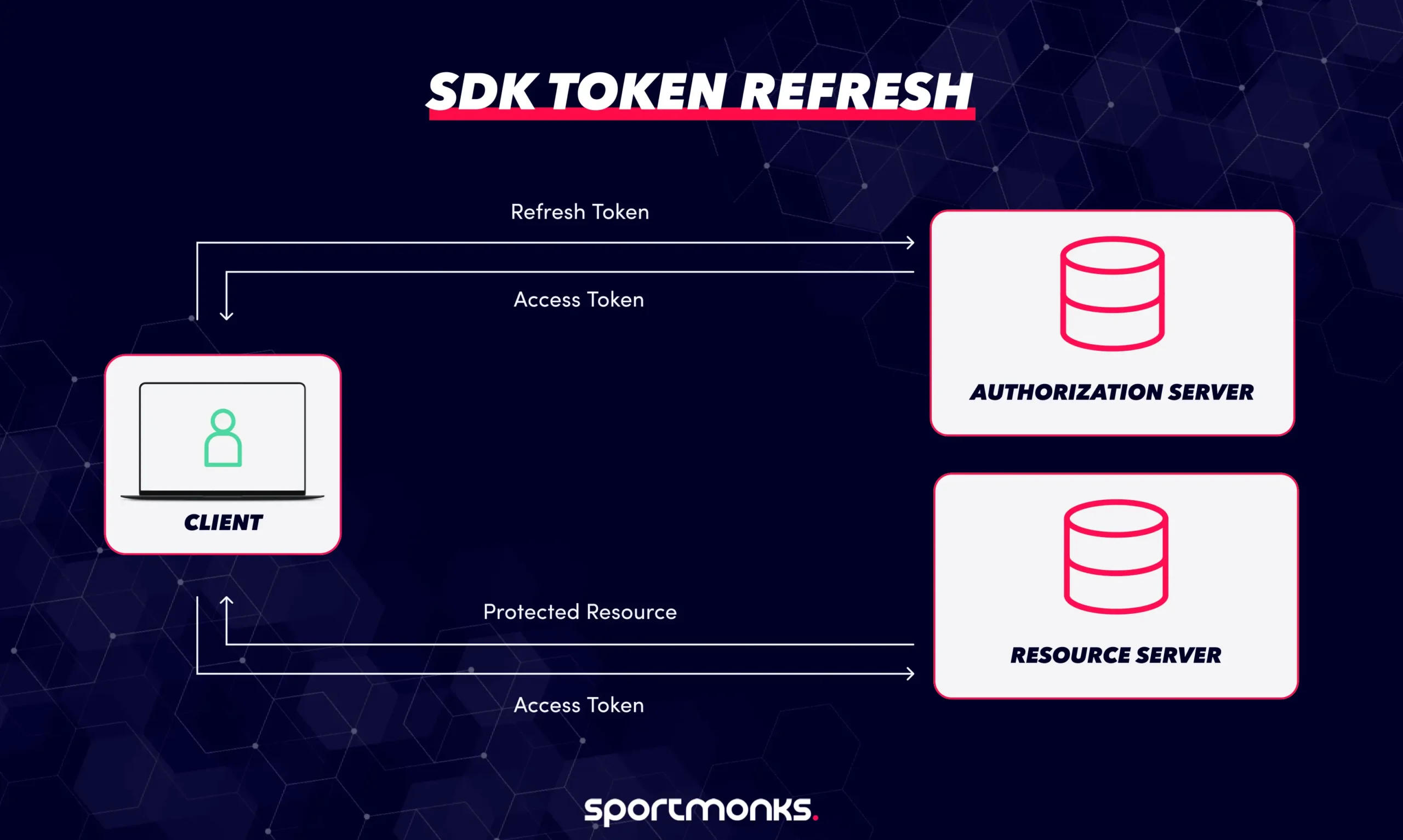
When an access token expires, the client application can use the refresh token. It sends a request to the authorization server’s “token endpoint” with a specific parameter, grant_type=refresh_token, along with the refresh token itself. If the refresh token is valid, the authorization server will issue a new access token to the client. Depending on the server’s security policy, it might also issue a new refresh token at the same time, making the old one invalid. This process allows for continuous, secure access to an API without constantly interrupting the user for re-authentication.
Why refresh tokens matter for SDKs
Access tokens alone present a challenge: once they expire, users would need to go through the login process again, which can be frustrating. In applications where users expect to stay logged in for extended periods (like mobile apps, desktop software, or background services), refresh tokens are essential. They are critical for:
– Enabling seamless background access: Refresh tokens allow the application to automatically get new access tokens without constantly asking the user to log in again. This creates a smooth and uninterrupted experience.
– Enhancing security: By allowing access tokens to have a short lifespan (minutes or hours), the risk is significantly reduced if an access token is ever stolen or compromised. A short-lived access token provides a limited window for an attacker to misuse it.
– Simplifying developer experience: SDKs (Software Development Kits) are designed to handle the entire lifecycle of these tokens behind the scenes. This means developers don’t have to worry about the complex logic of managing token expiration and renewal, abstracting away a lot of the complexity.
When and how to trigger a token refresh
SDKs use different strategies to manage when to get a new access token, aiming for both security and a smooth user experience.
Strategies for triggering refresh
There are two main ways SDKs handle refreshing tokens:
Proactive refresh (Before expiry)
– How it works: The SDK actively checks the access token’s expiration time (usually found in the exp field of a JWT or the expires_in value). When the token is close to expiring (for example, within 60 seconds), the SDK automatically uses the refresh token to get a new access token before any new API requests are made.
– Benefits: This approach provides a smoother experience for the user because it avoids errors. API calls won’t fail due to an expired token, leading to fewer interruptions.
– Recommendation: Most experts recommend this method to minimise failed requests and keep the process simpler and more reliable.
Reactive refresh (on 401 error)
– How it works: In this strategy, the SDK waits for an API request to fail with a 401 Unauthorized or invalid_token error, which indicates the access token is no longer valid.
– Process: Once a 401 error is detected, the SDK then initiates a refresh request to get a new access token. After successfully getting a new token, it retries the original API call that failed.
– Challenges: This method can introduce more complexity, especially when multiple API calls happen at the same time. You need to handle “race conditions” (where multiple requests try to refresh simultaneously) and ensure you don’t send duplicate refresh requests.
When and how to trigger a token refresh
SDKs use different strategies to manage when to get a new access token, aiming for both security and a smooth user experience.
Strategies for triggering refresh
There are two main ways SDKs handle refreshing tokens:
Proactive refresh (Before expiry)
– How it works: The SDK actively checks the access token’s expiration time (usually found in the exp field of a JWT or the expires_in value). When the token is close to expiring (for example, within 60 seconds), the SDK automatically uses the refresh token to get a new access token before any new API requests are made.
– Benefits: This approach provides a smoother experience for the user because it avoids errors. API calls won’t fail due to an expired token, leading to fewer interruptions.
– Recommendation: Most experts recommend this method to minimise failed requests and keep the process simpler and more reliable.
Reactive refresh (on 401 error)
– How it works: In this strategy, the SDK waits for an API request to fail with a 401 Unauthorized or invalid_token error, which indicates the access token is no longer valid.
– Process: Once a 401 error is detected, the SDK then initiates a refresh request to get a new access token. After successfully getting a new token, it retries the original API call that failed.
– Challenges: This method can introduce more complexity, especially when multiple API calls happen at the same time. You need to handle “race conditions” (where multiple requests try to refresh simultaneously) and ensure you don’t send duplicate refresh requests.
SDK refresh flow overview
A typical process for refreshing tokens in an SDK involves:
Expiry detection
The SDK constantly monitors the access token’s expiration time. This can be done by reading the exp (expiration) claim if the token is a JWT, or checking the expires_in field provided when the token was first issued.
Refresh request
When a refresh is needed, the SDK sends a POST request to the authorization server’s /oauth/token endpoint. This request typically includes:
POST /oauth/token

grant_type=refresh_token

&refresh_token=...

&client_id=...

[&client_secret=...]
(The client_secret is used by confidential clients, like server-side applications, but usually not public clients like mobile apps).
Token rotation
For enhanced security, some authorisation servers implement refresh token rotation. This means that when a refresh token is used to get a new access token, the authorisation server also issues a new refresh token and immediately invalidates the old one. The SDK must be designed to detect this, securely store the new refresh token, and discard the old one. This makes a compromised refresh token single-use, significantly reducing its value if stolen.
Retry logic
For reactive refresh strategies, the SDK will temporarily pause or queue any pending API requests. Once the token refresh is successful and the new token is available, the SDK then retries these queued API calls using the new access token.
Handling race conditions
“Race conditions” happen when multiple API calls are made around the same time and all try to refresh the token reactively.
If two API calls simultaneously detect an expired token and both attempt to fetch a new one, one of those refresh requests might fail because the other request successfully refreshed the token and invalidated the old refresh token.
Mitigation
SDKs can prevent this by implementing:
– Mutex locks: Only allow one process to attempt a token refresh at a time.
– Request deduplication: Identify and combine multiple simultaneous refresh attempts into a single one.
– Centralised token-refresh manager: A dedicated part of the SDK handles all token refresh logic, preventing conflicts.
Some platforms offer a “grace period” or “leeway” where both the old and newly issued refresh tokens are temporarily valid. This helps reduce the risk of collisions during near-simultaneous refresh attempts caused by network delays or concurrent client actions.
Refresh practices by provider
Different authentication providers have specific behaviors for token refresh:
– Auth0: They recommend proactive refresh (before the token expires) to maintain a smooth user experience. Auth0 supports refresh token rotation, where a new refresh token is issued with each successful exchange, and the old one is invalidated. They also apply rate limits to refresh token exchanges to prevent abuse.
– Okta: Okta’s SDKs provide built-in support for token refresh. Refresh requests follow the standard token endpoint process and typically require the offline_access scope during the initial login. Okta SDKs are designed to securely store the newly rotated refresh token.
– Microsoft (Azure/Microsoft identity platform):
– Access tokens are generally short-lived.
– The default lifetime for refresh tokens is typically 24 hours for single-page applications (SPAs) and 90 days for other types of applications.
– The Microsoft identity platform issues a new refresh token upon refresh but does not automatically revoke the old one. This means SDKs (or the application’s code) must proactively delete the old refresh token to ensure it’s not reused.
Top security tips for token refresh
Making sure how your app gets new access tokens is secure is super important. Here’s how to do it well:
Latest security rules (RFC 9700)
– Follow new rules: A new guide (RFC 9700, Jan 2025) says that when your app gets a new access token, it must also get a new refresh token, and the old refresh token should be made invalid straight away. It also stresses checking website addresses strictly, stopping certain cyber attacks, and using special codes (PKCE) for public apps.
– Stop replays: The server that gives out tokens must spot if someone tries to use an old, invalid refresh token again. If it does, it should cancel all related tokens and make the user log in again.
Token lifespans & changing tokens
– Short access tokens: Use access tokens that only last a short time (15-30 minutes). This means if one is stolen, it’s not useful for long.
– Change refresh tokens every time: Every time you use a refresh token, the server should give you a new one and make the old one useless.
– Spot old tokens: If an old, invalid refresh token is used again, the server must cancel all linked tokens and make the user log in from scratch.
Safe storage & sending
– Always use HTTPS: Always send tokens using HTTPS (the secure web address, starting with https://). Never send them without encryption.
– For apps & servers: Store tokens in secure places on the device’s operating system (like iOS Keychain or Android Keystore) and make sure they’re encrypted when saved.
– For websites (SPAs): Don’t store refresh tokens where website code (JavaScript) can easily get to them. Use HttpOnly, Secure, SameSite cookies or a “Backend-for-Frontend” (BFF) setup, so the refresh token stays safe on the server.
App checks & limiting access
– Strong app checks: For server-side apps, use secure methods to prove who the app is. Don’t hide secrets directly in frontend code.
– Give only what’s needed: When giving out tokens, only give them the smallest amount of access (scopes) that the app actually needs. Link access tokens to specific resources to limit damage if they’re misused.
Cancelling tokens & keeping records
– Cancel tokens clearly: Make sure tokens can be cancelled immediately when a user logs out, changes their password, or an admin revokes access. Your app should notice this and ask the user to log in again.
– Keep audit logs: Keep detailed records of all token events (when they’re given out, changed, refreshed, or cancelled). Watch for unusual activity, like strange reuse patterns or too many refresh requests, which could signal a problem.
Extra security steps
– Limit refresh requests: Put limits on how often new tokens can be requested to stop attempts to guess or replay tokens.
– Avoid risky methods: Don’t use older, less secure ways of getting tokens (like Implicit or ROPC flows), especially for frontend apps. Stick to the more secure “Authorization Code Flow with PKCE.”
– Occasional re-login: Think about making users log in again sometimes (e.g., after a long time, or before very sensitive actions) to reduce long-term reliance on any single token.
Keep your apps secure with Sportmonks
Sportmonks offers some of the best football data coverage available, making it ideal for your betting, fantasy, livescore, or prediction app. Our APIs are secured with HTTPS and use API tokens, which are straightforward for developers to set up and start using right away.
Why not try the Sportmonks Football API today and give your customers even more valuable football insights?
Faqs about SDK token refresh
GET https://api.sportmonks.com/v3/football/fixtures?api_token=YOUR_TOKENor with a header
GET https://api.sportmonks.com/v3/football/fixtures

Authorization: YOUR_TOKEN