

Contents
What a training set needs
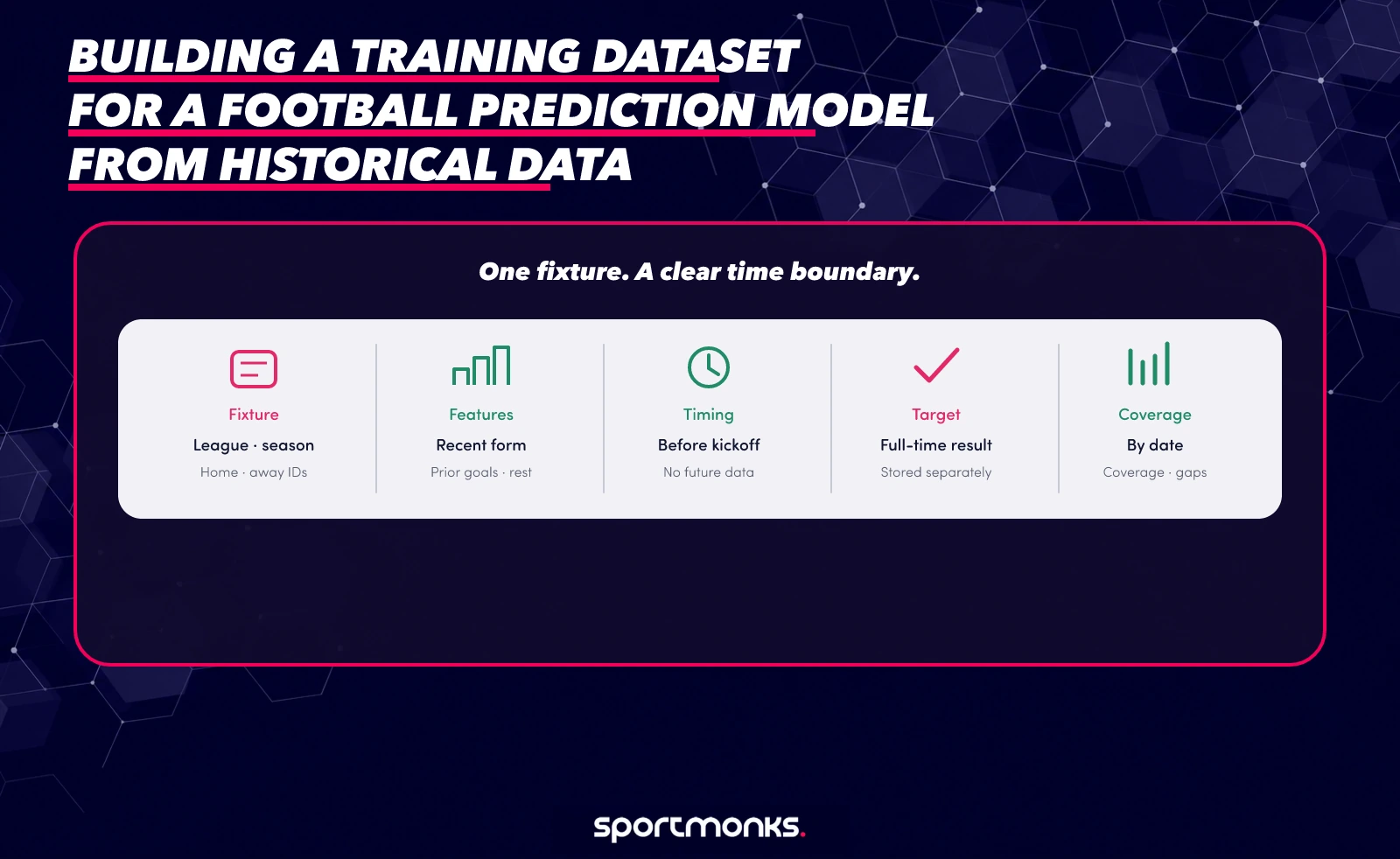
A training dataset is a collection of examples that teaches a model to connect inputs with an outcome. For a pre-match football model, one row might represent one fixture. Its features describe what was known before kickoff, and its target records what happened afterwards.
That boundary matters. If your model predicts a result before the match, the final score is a label, not an input. Match statistics, lineup details or xG recorded after the game cannot be used as pre-match features for that same fixture. They can still help create features for a later match, once the earlier match has finished and the data is available.
Choose the prediction question before collecting fields. “Home win, draw or away win?” needs a different target from “How many goals will the home side score?” or “Will both teams score?” Write down the target, the point in time when you would make the prediction, and the leagues and competitions your product serves. Those choices determine which data belongs in the dataset.
Be precise about the label. A full-time result target needs a consistent definition for home win, draw and away win. A goals model needs to decide whether it predicts each team separately or the match total. Do not mix extra time, penalties or abandoned matches into the same target without a rule that matches the product. Store the match state and the source score records with the label so you can review how it was derived.
Keep the target separate from the features in both code and storage. A split such as fixture metadata, feature values and labels makes it easier to audit your pipeline. It also helps if you later change the question. You can rebuild a goals target from stored scores without collecting every fixture again, as long as the source records and definitions are preserved.
A useful first version usually needs four groups of information. Preserve source fields and derived features separately so each can be checked:
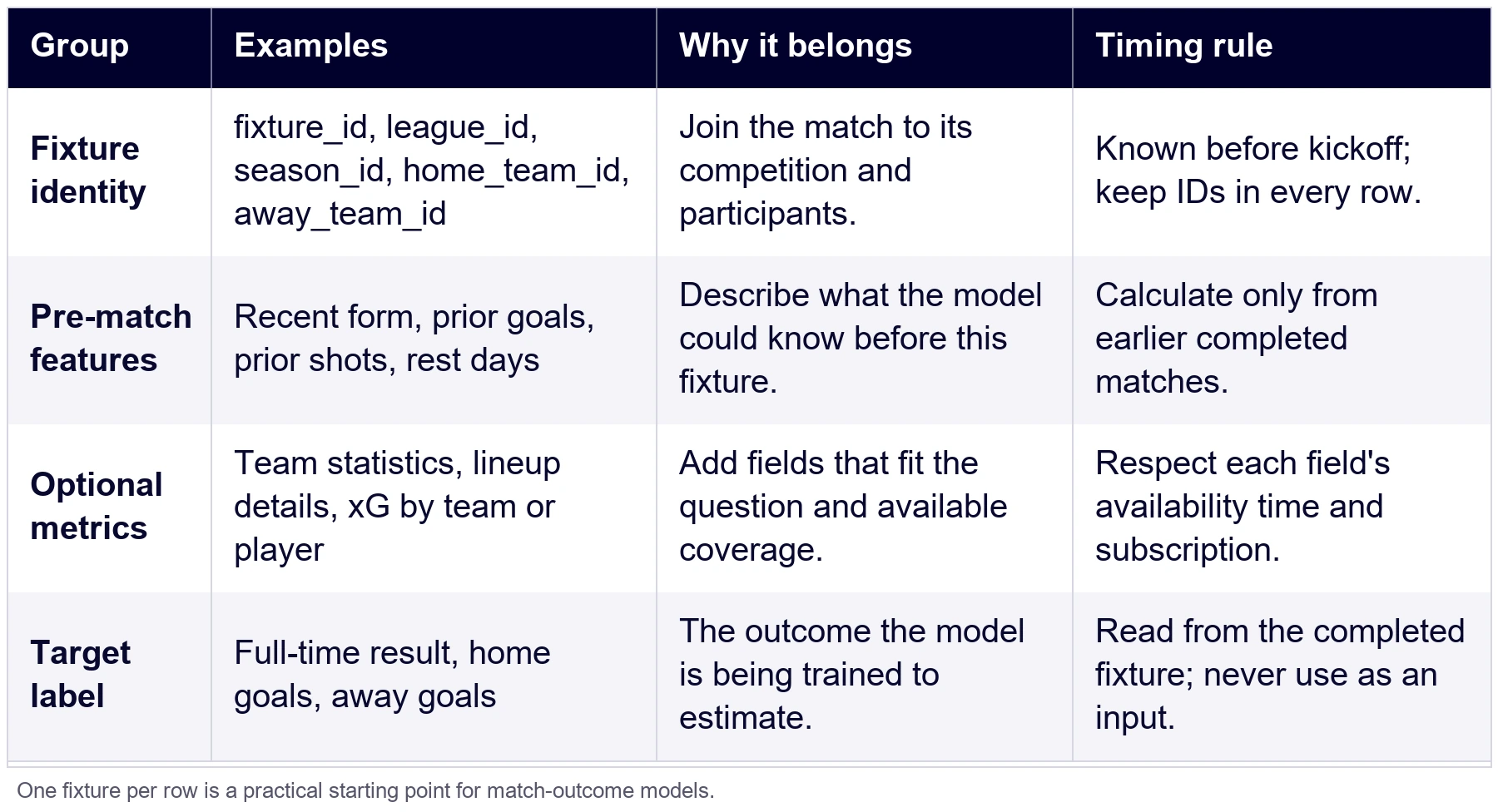
Keep the original fixture and participant IDs in the stored data. Names can change, and two teams may have similar names. Use the IDs to join records, then add readable names for analysis and debugging.
Choose one row grain and keep it consistent. One row per fixture is a practical start for a match-outcome model. If you later model player performance, a row per player-fixture may fit better, but do not mix those two grains in the same training file without a clear design.
How many seasons is enough, and when old seasons hurt
There is no season count that works for every prediction question. A useful dataset needs enough examples to cover the situations your model will meet, but older rows are not automatically better. The right test is whether adding an earlier season improves performance on matches that occur later.
Start with a clear baseline window, such as the most recent two or three completed seasons that are available for your selected league. Treat that as an experiment, not a rule. Then compare it with a longer window and, if your use case changes quickly, a shorter rolling window. Keep the future evaluation period fixed while you compare. Otherwise, you will not know whether the model improved because of the data window or because the test period changed.
Older seasons can add valuable examples of unusual scores, promotions, relegations and different competition stages. They can also describe a football environment that has changed. Coaches, squads, tactics, competition formats and data definitions move over time. Card and booking patterns, for example, can shift with coaching and playing style, so a much older season may be a poor guide to the matches your product sees now.
Use the decision table to choose what to test, then let the held-out results decide:
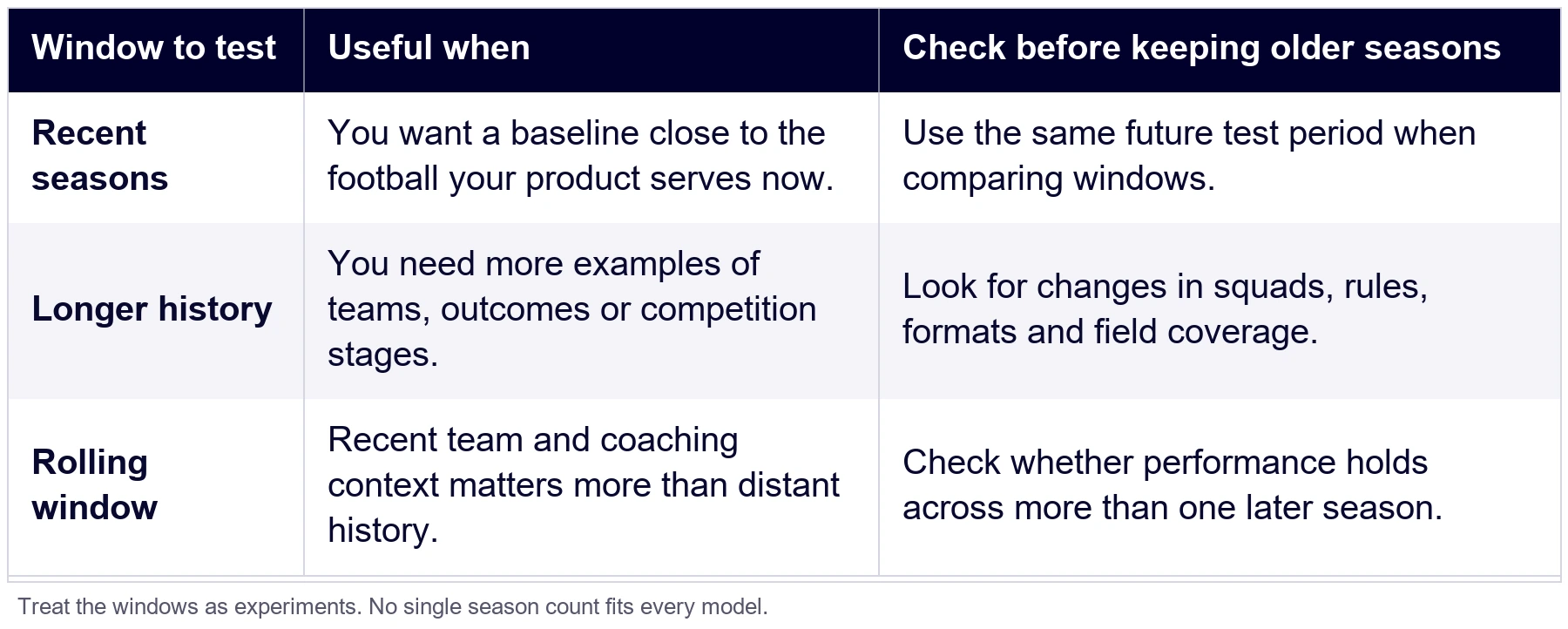
Compare windows using the same evaluation period and the same target. For a classification model, check more than accuracy. If one outcome is much more common than another, a model can look accurate by repeatedly selecting the majority class. Review a suitable metric such as log loss or Brier score alongside calibration and class-level results. Keep the evaluation method consistent across windows.
The historical add-on threshold is a subscription rule, not a recommendation for model design. Our plans and pricing page explains that the latest three seasons are included on self-serve plans and older seasons are purchased separately; Enterprise includes full historical access. The useful window for your model still depends on its purpose and the seasons available for the leagues and fields you need.
If you include xG, check its history separately from core fixture statistics. xG is an add-on. In the Premier League responses used here, both teams had xG values for 121 of 380 fixtures in 2023/24 and all 380 fixtures in 2024/25; no 2022/23 fixture returned team xG. Coverage varies by season, so use the current coverage page and xG coverage documentation before choosing a training window. Treat an absent xG relation as unavailable, not zero.
Pulling seasons from the API
Begin with the leagues in your target product. A league ID identifies the competition, and a season ID identifies a particular edition of it. The leagues endpoint lists leagues available within your subscription. The seasons endpoint returns seasons available within that subscription, including their IDs and league associations. Check the returned IDs instead of assuming that a year in a league name is enough to construct an endpoint.
The schedule by season endpoint returns a season’s schedule, arranged by stages and rounds. Use the fixture IDs in that response to request the match fields your feature plan needs. The schedule response does not replace the fixture endpoint when you need events, statistics, lineups or xG.
For an individual fixture, the documented fixture endpoint accepts includes for participants, state, scores, events, statistics and lineups. The xG documentation describes the xGFixture include for team values and lineups.xGLineup for player values. The request below shows the data relationships in one call. Replace the fixture ID and token with values available to your account:
curl --get 'https://api.sportmonks.com/v3/football/fixtures/FIXTURE_ID' \
  --data-urlencode 'api_token=YOUR_API_TOKEN' \
  --data-urlencode 'include=participants;state;scores;statistics.type;lineups.details.type;xGFixture.type;lineups.xGLineup.type'
For a multi-season backfill, this example collects fixture IDs from each schedule, requests the fields needed for each fixture and saves the results as a JSON archive. Keep your API token in an environment variable.
import json
import os
from pathlib import Path
import requests

BASE = "https://api.sportmonks.com/v3/football"
SEASON_IDS = (19734, 21646, 23614)
INCLUDES = "participants;state;scores;statistics.type;xGFixture.type"
TOKEN = os.environ["SPORTMONKS_API_TOKEN"]

session = requests.Session()

def get_data(path, **params):
    response = session.get(
        f"{BASE}/{path}",
        params={"api_token": TOKEN, **params},
        timeout=30,
    )
    response.raise_for_status()
    return response.json()["data"]

def fixture_ids(value):
    if isinstance(value, dict):
        if {"id", "season_id", "starting_at_timestamp", "participants", "scores"} <= value.keys():
            yield value["id"]
        for child in value.values():
            yield from fixture_ids(child)
    elif isinstance(value, list):
        for child in value:
            yield from fixture_ids(child)

archive = {}

for season_id in SEASON_IDS:
    schedule = get_data(f"schedules/seasons/{season_id}")
    ids = sorted(set(fixture_ids(schedule)))
    if len(ids) != 380:
        raise ValueError(f"Expected 380 fixtures for {season_id}, got {len(ids)}")
    archive[str(season_id)] = [
        get_data(f"fixtures/{fixture_id}", include=INCLUDES)
        for fixture_id in ids
    ]

Path("premier-league-history.json").write_text(
    json.dumps(archive, indent=2),
    encoding="utf-8",
)
See the fixture endpoint reference and the xG include guide for the supported relationships. If you are not using xG, remove the xG includes. An include requests a relationship; it does not grant access to an add-on or fill data that is absent for a league or season.
Store the response with its fixture ID, league ID, season ID and the time you retrieved it. Keep the request scope with the saved response too: requested includes, filters and any date range. That makes it possible to distinguish a missing field from a request that never asked for it.
A historical football data API can return season metadata and schedules, but your account determines which records are available. A season ID in a response is a starting point for the backfill, not a promise that every feature you want exists for every match in that season.
A season backfill can involve many fixture requests. Plan for your subscription’s request limit and retry failed calls without duplicating records. Save successful responses as immutable raw files before transforming them. That gives you a point of comparison if your parser changes or you need to rebuild features.
Turning fixtures into features
For a match outcome model, one row per fixture connects the teams, their histories and the result. The table below shows five rows built from the 2024/25 Premier League responses. Each form value averages the team’s five previous completed matches before kickoff. The fixture being predicted is never part of its own five-match window. From 1,140 completed fixtures across the three seasons, 1,070 rows had five prior matches available for both teams. The full-time score is the target label, not an input feature.
For example, this fixture response keeps the match, participants, result, shots and xG together before you shape the records for analysis. For a pre-match model, use only information that would be available at prediction time.
{
  "data": {
    "id": 19134554,
    "league_id": 8,
    "season_id": 23614,
    "name": "Brentford vs Manchester City",
    "starting_at": "2025-01-14 19:30:00",
    "participants": [
      {"id": 236, "name": "Brentford", "meta": {"location": "home"}},
      {"id": 9, "name": "Manchester City", "meta": {"location": "away"}}
    ],
    "scores": [
      {"participant_id": 236, "score": {"goals": 2, "participant": "home"}, "description": "CURRENT"},
      {"participant_id": 9, "score": {"goals": 2, "participant": "away"}, "description": "CURRENT"}
    ],
    "statistics": [
      {"participant_id": 236, "type_id": 42, "data": {"value": 18}},
      {"participant_id": 9, "type_id": 42, "data": {"value": 21}}
    ],
    "xgfixture": [
      {"participant_id": 236, "type_id": 5304, "data": {"value": 2.4423}},
      {"participant_id": 9, "type_id": 5304, "data": {"value": 2.1168}}
    ]
  }
}
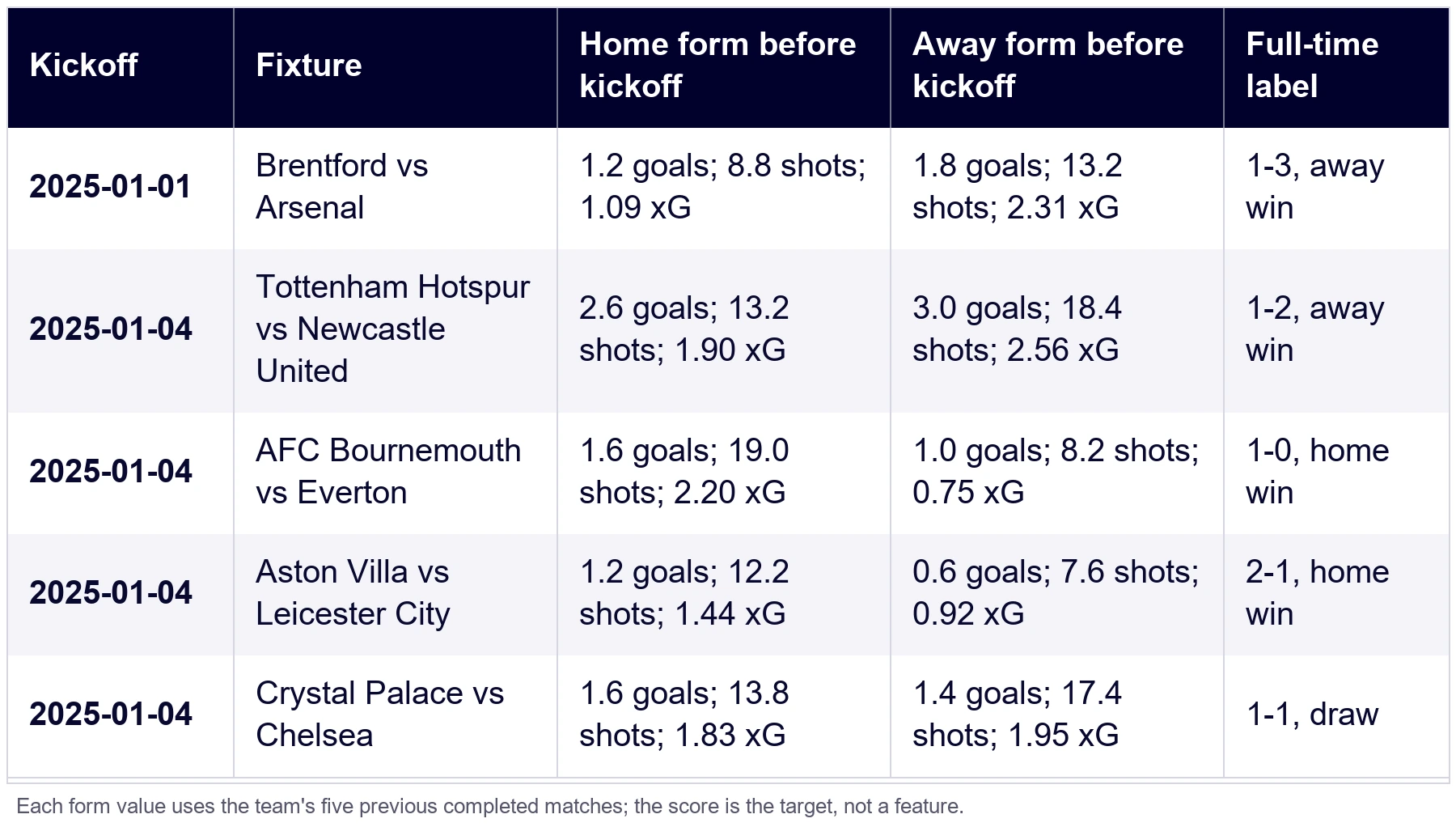
Apply the same cutoff to every rolling feature, including away-team form, shots, points and xG. Record the number of prior matches behind each average so early-season rows with insufficient history remain distinct from a measured zero.
If you use team statistics, retain the statistic type ID and value. Do not depend only on display labels, which can be localized or formatted for people. For xG, preserve the metric type and whether it belongs to the team or player. Keep the source precision and round only for display.
Missing data needs an explicit meaning. An empty xG relation does not mean an xG value of zero. A missing lineup may mean that the lineup was not available at the time you collected the match, while a statistic may not be covered for that league or season. Store null for an absent value and, where useful, a separate availability flag. Do not fill every gap with zero unless zero is the actual observed value.
Think carefully about how features behave across leagues. A raw shot count in one competition may not be directly comparable with a value from another if the coverage, schedule or data depth differs. Keep league and season identifiers in the training row. If your model pools competitions, test whether league or season context should be represented explicitly and calculate any scaling or normalization using training data only.
A stored schema also helps you compare models fairly. You can create one feature set using core statistics across a longer period and another that uses xG for the leagues and seasons where it is available. If you compare them, use the same fixtures where both feature sets exist and the same future test period. Otherwise, the measured difference may come from sample coverage rather than the metric.
Avoiding leakage: split by date
Data leakage happens when a model receives information that would not have been available when it made a prediction. A random train-test split can put a later fixture in the training data and an earlier fixture in the test data. In football, both rows may share teams, players, coaches or season conditions, so the model can learn details of the future evaluation period.
Sort fixtures by kickoff time and split them chronologically. Use older matches for training, a later block for validation and the newest block for the final test. If you tune the model or choose features, do that using the training and validation periods. Keep the final test period untouched until those choices are fixed.
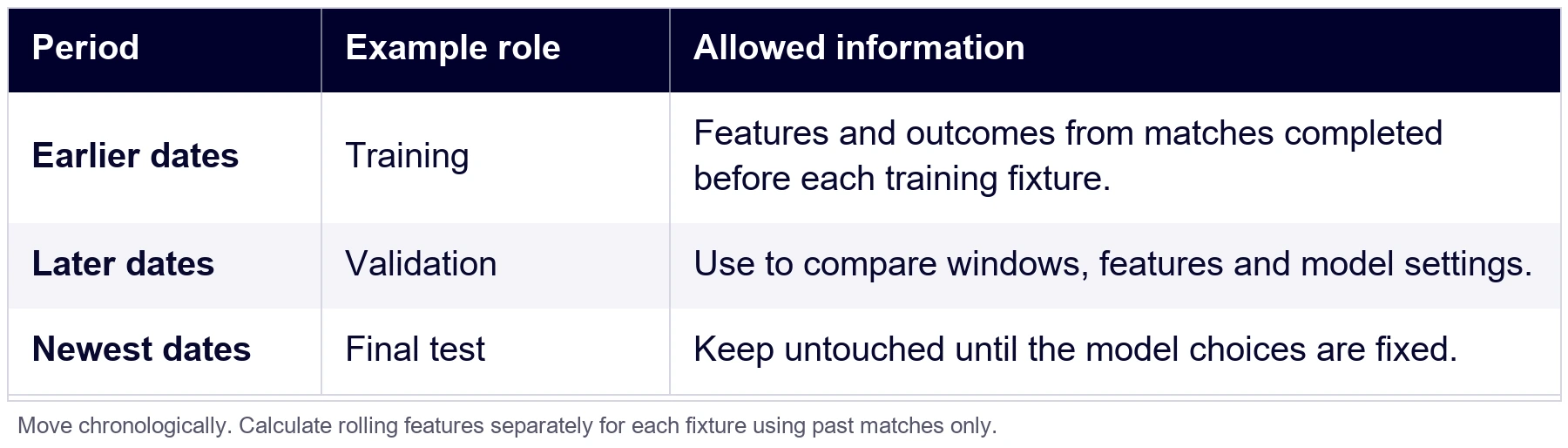
For repeated evaluation, walk forward through time. Train on an earlier block, validate on the next block, then move the boundary forward. This shows whether a model’s performance changes between seasons. The scikit-learn TimeSeriesSplit documentation describes a time-ordered cross-validation approach; choose a splitter that matches your fixture schedule and season boundaries.
A simple single split looks like this:
train = matches[matches["starting_at"] < "2025-01-01"]
test = matches[matches["starting_at"] >= "2025-01-01"]
For this sample, the 1 January 2025 cutoff leaves 878 earlier rows and 192 later rows after requiring five previous matches for both teams. If you include xG, keep only rows with the required xG values in both periods; that leaves 202 training rows and 192 test rows here. The test features can use completed matches from earlier dates, but keep the test outcomes untouched while choosing features and settings. These counts describe this dataset, not a performance result.
Create rolling features after setting the temporal boundary. For every match in the validation or test block, calculate form from matches completed before that match. When a new season begins, decide whether to carry over the previous season’s results, how to treat promoted teams, and how many observations are needed before a rolling feature is populated. Apply the same rule in training and in production.
Fit transformations on the training block only. This includes imputers, scalers, feature selection, target encoders and any learned league averages. If a transformation calculates a mean or category mapping from the full dataset before splitting, future information can leak into training even when the model rows themselves are sorted correctly.
Finally, keep labels out of features. For a full-time result model, final scores create the target. They do not belong in the pre-match input row. The same applies to post-match statistics, final lineups if your prediction happens before lineups are confirmed, and any value that becomes known after your product would issue the prediction.
Checking coverage gaps per league
A large response is not automatically a complete dataset. Check what you received against the competitions, seasons, fixture IDs, fields and date boundaries you intended to collect. Your API plan, historical access, add-on coverage and the availability of individual records all affect what can be used.
Start with the current coverage information for the league and data type. Then enumerate the season IDs your account can access. For each season, record the fixture IDs in the schedule and compare them with the fixture responses you successfully stored. Use completed matches as the denominator for post-match features. Keep postponed, abandoned or unfinished fixtures in a separate state category rather than silently counting them as ordinary missing data.
The responses matched all 380 scheduled fixtures in each season. Shots Total was present for both teams in every fixture, while team xG coverage changed by season:
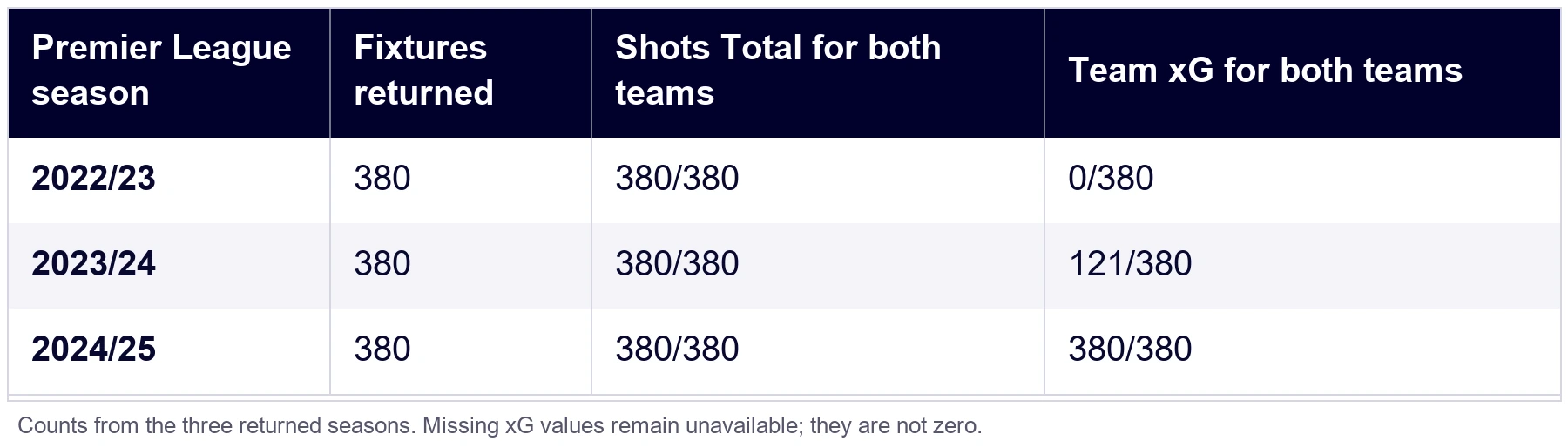
For each field, count how many eligible fixtures contain a value and how many do not. Calculate the missing rate against the eligible fixture set, then inspect examples. A low missing rate can still cluster in one season, round or team and affect the model’s evaluation. A high rate may mean the field is not included in the subscription, is not covered for that competition, or was absent from the request.
Check the shape of the gaps as well as the total. Compare coverage by season, month, round, team and match state. A season can have almost all its fixtures stored while missing a particular round or several postponed matches. Duplicated fixture IDs can also inflate the row count without adding new examples. For each reported gap, inspect a few fixture IDs in the raw response and the parsed output before deciding that the whole season is incomplete.
Keep the raw response and parsed training row separate. If a field is missing, first check the request, the subscription, the competition coverage and the fixture state. Only then decide whether to exclude that feature, narrow the training period or document the gap. Avoid silently dropping every fixture that has one empty field, since that can bias the sample toward competitions with deeper coverage.
For each release of the dataset, save the collection date, selected league and season IDs, feature definitions, target definition, filters, and the coverage summary. If you rebuild the dataset later, those notes let you compare like with like and explain why a feature or row count changed.
If you want to test a real request before planning the full backfill, start with our free Football API plan, then check the coverage page and your account’s access. For a separate baseline or provider-side comparison, see the Football Predictions API; do not mix its probabilities into your own training features unless they would genuinely be available at prediction time and your model design calls for them.
If your league or season access is unclear, contact our human support team with the league ID, season ID and fields you need.
This article explains how to assemble and evaluate a football prediction dataset. It is not betting advice, and model probabilities do not guarantee results. If you build betting features, follow the laws that apply to your product and provide responsible gambling information to your users.
Frequently asked questions
