

Contents
Choosing how many football API leagues to launch with starts with a familiar decision: an English fan app needs the Premier League, but including the FA Cup and Carabao Cup makes its domestic shortlist three competitions. A single-competition fantasy game can start with one, a comparison tool covering Europe's main domestic leagues needs five, and adding Brazil, Mexico and the US brings that example to eight. We have 2,200+ leagues in one format, so start with the competitions your users follow, count cups separately and check the fields each feature needs before expanding the same integration.
Start from your users, not the league count
Choosing football API leagues starts with a product promise. Write one sentence describing who the app serves and what they can do with it. “Follow English clubs across their domestic and European fixtures” creates a different shortlist from “compare forwards in the five biggest European domestic leagues.” The first follows clubs across competitions; the second follows a defined group of leagues.
Use evidence you already have. For an existing app, look at competition searches, followed teams, match-page visits and requests to support. For a new product, ask prospective customers which teams and competitions they expect to find.
Their home country helps you start the conversation, but it does not tell you every competition they follow. A fan living in the Netherlands may also follow an English club.
Count football API leagues and cups separately
One country can contain several relevant competitions: a top division, lower divisions, domestic cups and women's football. Continental tournaments add another layer. List each separately before counting.
A country selector in your interface is a navigation choice, not a reliable way to calculate subscription scope.
A club's domestic league also does not contain its cup fixtures. If your promise covers every match a club plays, check its other competitions too. Decide how you will handle a club reaching a new tournament or moving between divisions.
These are changes to your shortlist, even when your app still serves the same supporters.
Split the list into launch and later. Launch competitions support a feature you will actually release. Later competitions have a reason for inclusion, but do not block the first version.
Keep one list for the product and development teams so an attractive extra does not quietly become a launch requirement.
Four product types and the leagues they need
Use the product promise to choose a first list. The examples below give you named competitions and a count to work from; they are planning choices, rather than minimum subscription requirements. Each addition should support a reader, player or customer action.
Live score and fan apps
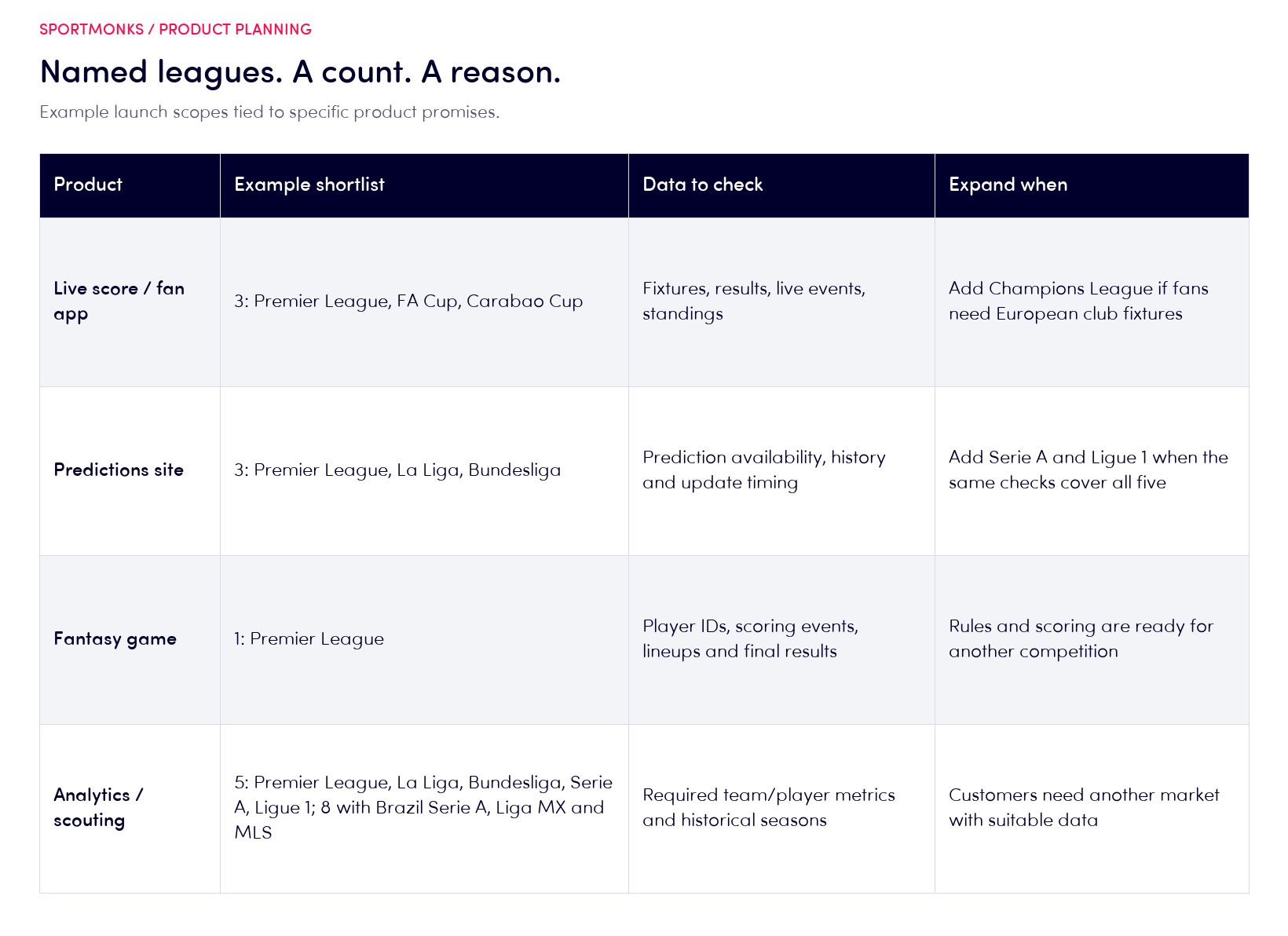
For an English domestic fan app, start with the Premier League (8), FA Cup (24) and Carabao Cup (27): three competitions. Add the Champions League (2) if following those clubs in Europe is part of the launch promise. Our Live Score API solution connects that match-day experience to fixtures, scores and events.
Breadth becomes more important when your product promises a daily scoreboard across countries. Before adding a competition, decide whether it belongs on the home screen, in search or only in a followed-team feed. Also check how postponed fixtures, changed kick-off times and seasons without matches will appear.
Coverage should support a useful navigation experience, not just a longer menu.
Fantasy games
A fantasy game tied to one competition can begin with that competition. Its scoring rules matter more than adding unrelated leagues. Write down every scoring event, the player identifiers you need, how lineups affect eligibility and when a result becomes final for your game.
Check those requirements before announcing the rules.
A Premier League game starts with one competition: league 8. Before adding another, decide whether players share one pool, how scoring compares and what happens when schedules overlap or a player transfers. Expand when those rules and their required data are ready.
Analytics and scouting products
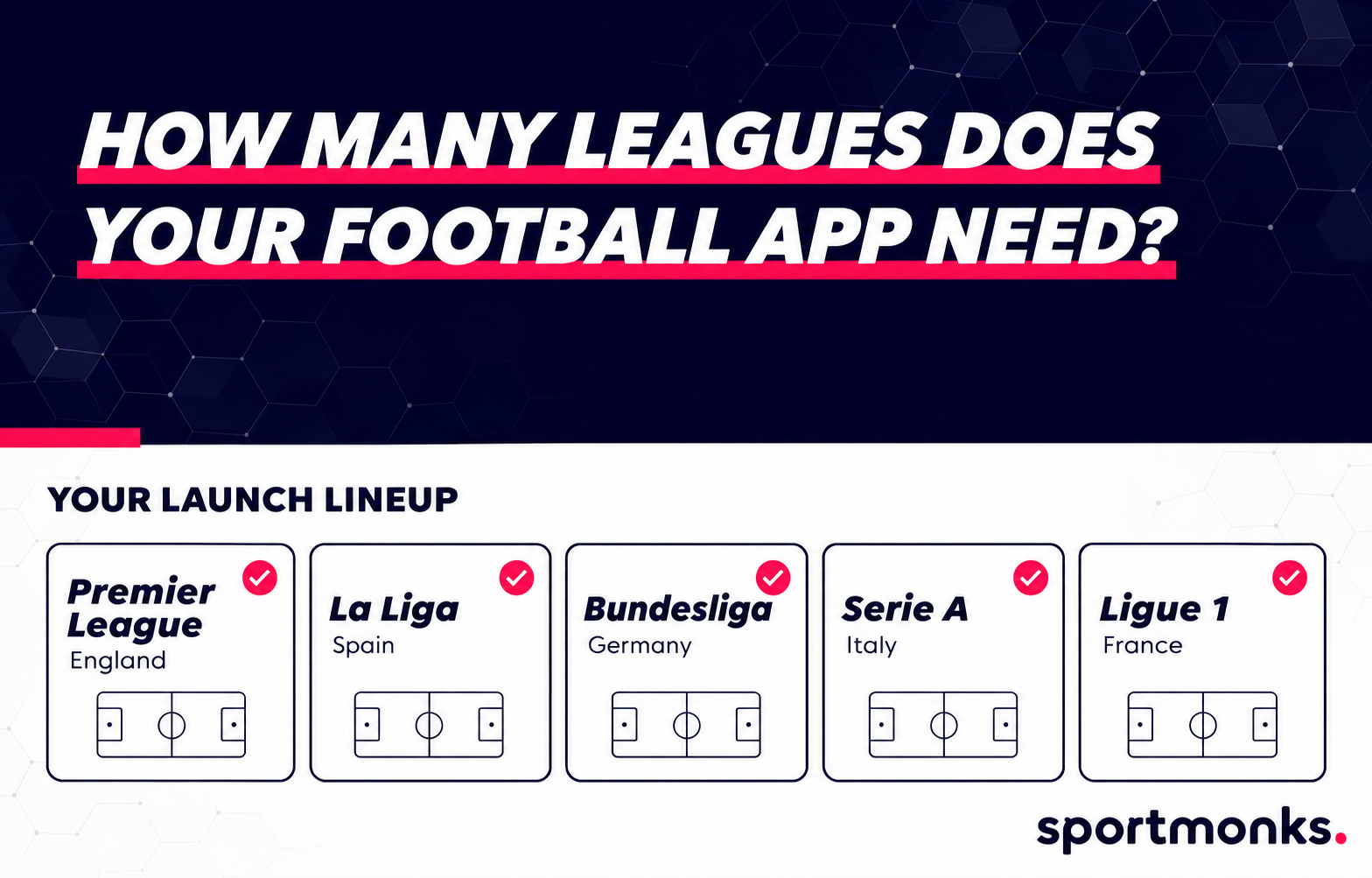
A European comparison tool can start with five: Premier League, La Liga, Bundesliga, Serie A and Ligue 1. An international recruitment brief might add Brazil's Série A (648), Liga MX (743) and Major League Soccer (779), making eight. Select those markets because customers need the comparison, then check the same metrics across all eight.
Historical seasons, minutes played and the availability of individual metrics can change the shortlist. If a report compares player passing, confirm that passing data exists at the required level in each selected competition. A match schedule alone cannot support that comparison.
Record gaps before you design a combined ranking, rather than discovering them after customers start filtering it.
Predictions sites
A predictions site covering three European domestic leagues can begin with Premier League, La Liga and Bundesliga: IDs 8, 564 and 82. Check prediction availability, the historical results behind your analysis and the timing of updates in each competition. A fixture listing alone does not establish that the prediction data you need is available.
Add Serie A and Ligue 1 when you are ready to maintain the same checks across five competitions. Explain probabilities as estimates, keep model evaluation separate from league count, and check any add-on access before promising the feature. More competitions create more pages to maintain; they do not establish prediction quality.
Depth matters as much as count
League count is the number of distinct competitions your app covers. Coverage depth is the set of data fields available within one competition, such as goals, lineups or player statistics. Our football coverage page separates categories such as fixtures, live scores and events, lineups, match statistics and player statistics.
Match those categories to your screens before choosing the final list. Our coverage-depth guide explains how to inspect the fields behind each feature.
For example, a score page needs different information from a player comparison tool. If detailed player metrics are essential, move that requirement into your launch criteria. If they are optional, design the interface so the competition remains useful without them.
A feature can disappear cleanly; an unexplained blank panel makes the whole page look unfinished.
Define what ready means for each competition
For every launch competition, record the fields the product requires, the relevant seasons and the timing of updates. Add a sample fixture to inspect and the name of the person responsible for checking it. Keep optional fields separate.
Otherwise, one missing extra can be confused with a failure of the core product.
Test the product's important states too. A coming fixture, a completed game and a postponed match will not have identical content. Distinguish a statistic returned as zero from a metric that is absent.
For a fantasy game, check the scoring fields; for an analysis tool, check the comparisons your customers will run. The question is whether the screen works with the data available for that competition.
How to check your shortlist in the Coverage Finder
Our Coverage Finder lets you search by league or country and inspect data categories for a competition. Open it in MySportmonks and take your named shortlist with you, including cups. The country list is a starting point for checking your product's requirements.
Work through the list in a fixed order
First, find the exact competition. Check its country and identity so similarly named leagues do not get mixed together. A league ID is the unique identifier for that competition in the API. Record it beside the display name.
Use that ID consistently in your project notes and API configuration.
Next, inspect the categories required by the product. An overall coverage rating helps you orient yourself, but the fields behind your main feature decide whether the competition fits. Then check your API plan's league selection and any add-ons.
Availability in the catalogue, access through your account and the content of an individual fixture answer different questions.
Finally, inspect relevant fixture responses in your integration. Choose examples that match the feature you are building, including the seasons you need. Save the outcome beside the shortlist so another member of the team can repeat the check.
A Brazil launch: three competitions, different depth
For a Brazilian national match tracker, start with Série A (648), Série B (651) and Copa do Brasil (654). That is three competitions. A service following São Paulo clubs through the state season would also need Paulista A1 (1313), bringing that particular shortlist to four.
We checked the three national competitions in Coverage Finder on 3 November 2026. Série A and Série B have an overall Excellent rating; Copa do Brasil has Good. For Série A, fixtures, lineups, live scores, goals, cards and substitutions are marked Excellent.
Copa do Brasil also has fixtures and lineups, with Excellent live-event coverage, but its Expected Goals category is marked Not in this league. Série B has the same xG limitation. A tracker can therefore plan around the score and timeline while checking its statistical panels separately. An xG panel should not be promised across this whole shortlist.
Keep the chosen competitions and required fields in the launch record. The Finder describes league coverage; your subscription and individual fixture responses still need checking. A national trio also does not include every state or continental fixture a followed club might play.
Build a launch list you can explain
Consider a fan app launching with the Premier League, La Liga, Bundesliga, Serie A and Ligue 1. That is five competitions. Adding the FA Cup and Champions League makes seven, even though those tournaments also contain clubs your users already follow.
The competitions, rather than the number of unique clubs, determine this count.
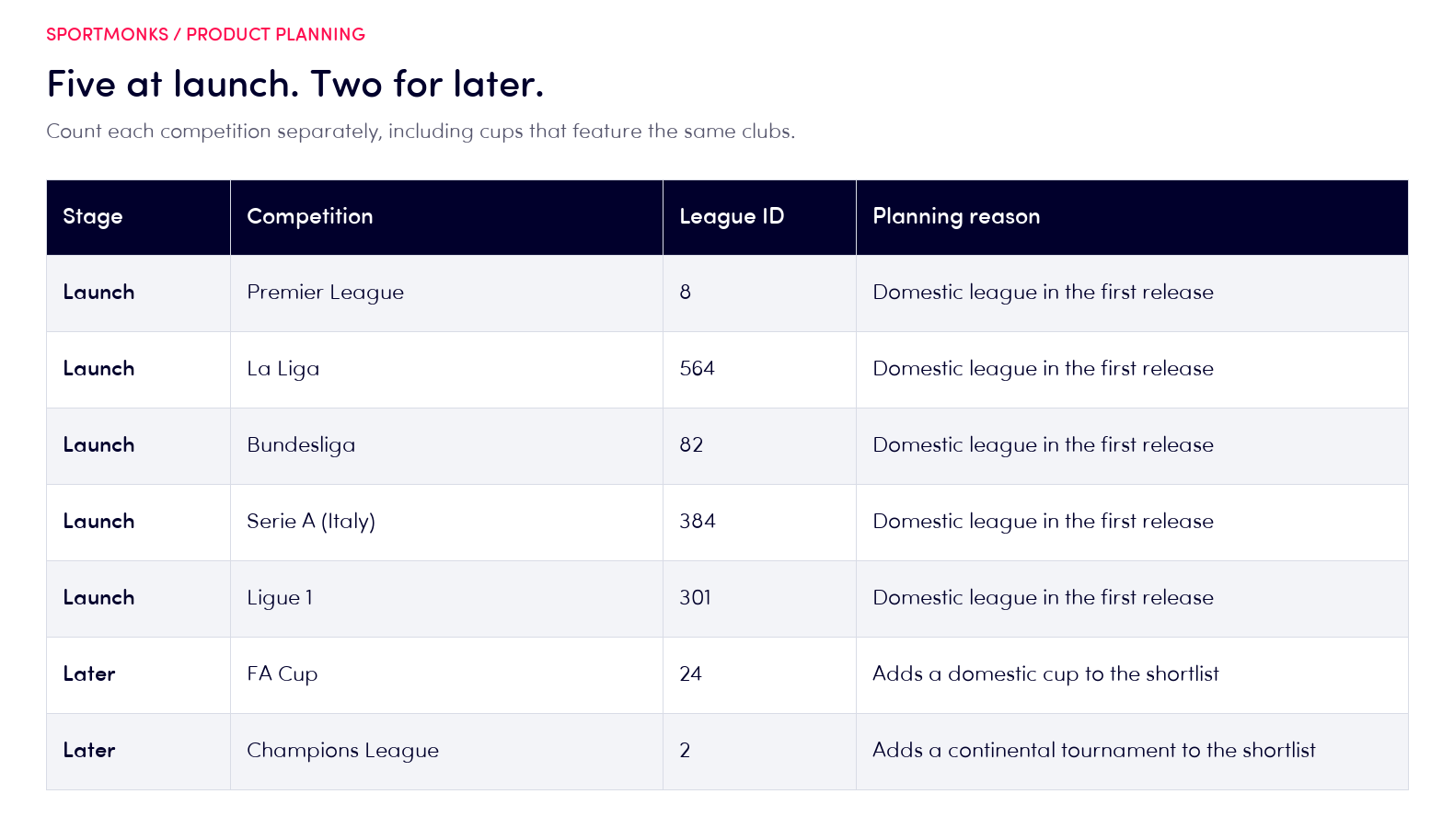
Use the shortlist planner below to move competitions between launch and later. It counts each league ID once and keeps the later list visible. You can also add a competition by its ID after finding it in Coverage Finder.
Open the request preview to see how the selected launch IDs fit into a fixture request.
Build your competition shortlist
Keep launch separate from later. Each competition counts once.
API request for your launch list
Change the dates to your required window. Follow every page of results.
Selected league IDs
Check coverage, your API plan and any add-ons in Coverage Finder.
If one of the later competitions is essential to the app's promise, move it into launch and review the scope again. The planner makes that trade-off visible before it becomes a missing match on a customer's screen.
Filter the first fixture request
Our fixtures by date range endpoint accepts league IDs through the fixtureLeagues filter. For the five domestic leagues in the example, the request is:
curl --get 'https://api.sportmonks.com/v3/football/fixtures/between/2026-11-01/2026-11-07' \
  --data-urlencode 'api_token=YOUR_API_TOKEN' \
  --data-urlencode 'include=participants;league' \
  --data-urlencode 'filters=fixtureLeagues:8,564,82,384,301' \
  --data-urlencode 'per_page=50' \
  --data-urlencode 'page=1'
We have this response from the request above, checked on 3 November 2026. One fixture is retained below, with unrelated fields and the other fixtures omitted; the pagination block is unchanged.
{
  "data": [
    {
      "id": 19713525,
      "league_id": 384,
      "name": "Como vs Venezia",
      "starting_at": "2026-11-01 11:30:00",
      "participants": [
        {
          "id": 267,
          "name": "Venezia",
          "meta": {
            "location": "away"
          }
        },
        {
          "id": 268,
          "name": "Como",
          "meta": {
            "location": "home"
          }
        }
      ],
      "league": {
        "id": 384,
        "name": "Serie A"
      }
    }
  ],
  "pagination": {
    "count": 45,
    "per_page": 50,
    "has_more": false,
    "current_page": 1,
    "next_page": null,
    "next_cursor": null
  }
}
The fixture's league_id is 384, matching Italy's Serie A in the launch filter. The full response reports 45 fixtures and has_more: false, so this result has no second page. The count describes the full page, not the single fixture retained in this excerpt.
Use your selected league IDs and the dates your product needs. The endpoint allows a maximum window of 100 days. Follow pagination until has_more is false so the shortlist is applied to the whole result set.
The filter narrows the request; it does not add leagues to your subscription.
Keep API tokens on your server. Your app's public interface should request the data through your backend rather than expose credentials in page code. Add only the includes your feature needs, then inspect the returned fixture and league identifiers before connecting the results to your screens.
Growing from a few leagues to all of them without rebuilding
We have 2,200+ leagues in one format. Keep league IDs in configuration, season IDs in their own records and a shared fixture template across competitions. Growing from five leagues to 500 can reuse that structure, with coverage and capacity checks for the expanded scope.
It still needs a release check. A new competition can bring different season dates, formats, available fields and matchday demand. Make sure filters, empty states and navigation handle it before adding it to public search.
Supporting a common data structure does not remove those product decisions.
Match the API plan to the shortlist
Our plans and pricing page lists five selected leagues for Starter, 30 for Growth and 120 for Pro, with all available leagues under Enterprise. We also offer extra leagues separately. A shortlist just above a plan's allowance is therefore a reason to compare configurations, rather than assume the next full plan is your only option.
Our Football API base plans share core data features and differ by league selection and request capacity. Check add-ons separately. Adding more leagues does not automatically enable every metric or odds product.
Likewise, a plan with unused league slots does not establish that those competitions belong in your launch.
When changing selections, check the monthly swap limit in your account. Keep the product's launch list and the account's selected leagues aligned, especially when removing a competition that still has followed teams or scheduled imports. Confirm the change before your app starts requesting the replacement.
Expand when users give you a reason
Review searches with no results, followed clubs and requests for missing competitions. Before adding the next group, use this launch checklist:
- Name the competitions: one Premier League fantasy game needs one; the English domestic fan example needs three.
- Count each league ID once, including cups as separate competitions.
- Verify required fields and subscription access for every addition, then test its busiest match-day request pattern.
- Keep optional competitions on the later list, and review usage after adding them.
A larger catalogue earns its place when customers can find and use the competitions they asked for.
Start with our free Football API plan and get to your first API call in under 5 minutes. Then choose the league selection your launch needs. Confirm the leagues included in your API plan before using the example request.
We offer 7-day human support. Bring the shortlist and the fields you need, and we can help with the configuration. Check our terms of service and your agreement before expanding how you distribute or display the data.
Frequently Asked Questions
We cover 2,200+ leagues and cups worldwide. That is our API catalogue, rather than a count of every football competition in existence. For your app, count the named competitions your audience needs, including cups, then check their fields and your subscription access.
Five can be enough when those competitions support your launch promise and have the fields your features require. Count cups separately and check the clubs your audience follows. A focused product can need fewer competitions; a service promising broader match coverage will need more.
Check the competition's coverage and your access. A league selection does not establish that every field exists for every fixture, season or data level. Core features, add-ons and historical availability need to match the product you are building.
Yes. We offer extra leagues and larger API plans. Keep competition selection in configuration so additions reuse your existing integration.
Check coverage, season structure and request demand before making a new competition visible to customers.
Launch with all available leagues when your product has a clear need for that breadth and can support the resulting experience. Otherwise, start with the competitions your audience needs, keep a later list and expand when demand supports it.
