
Contents
What you’ll build
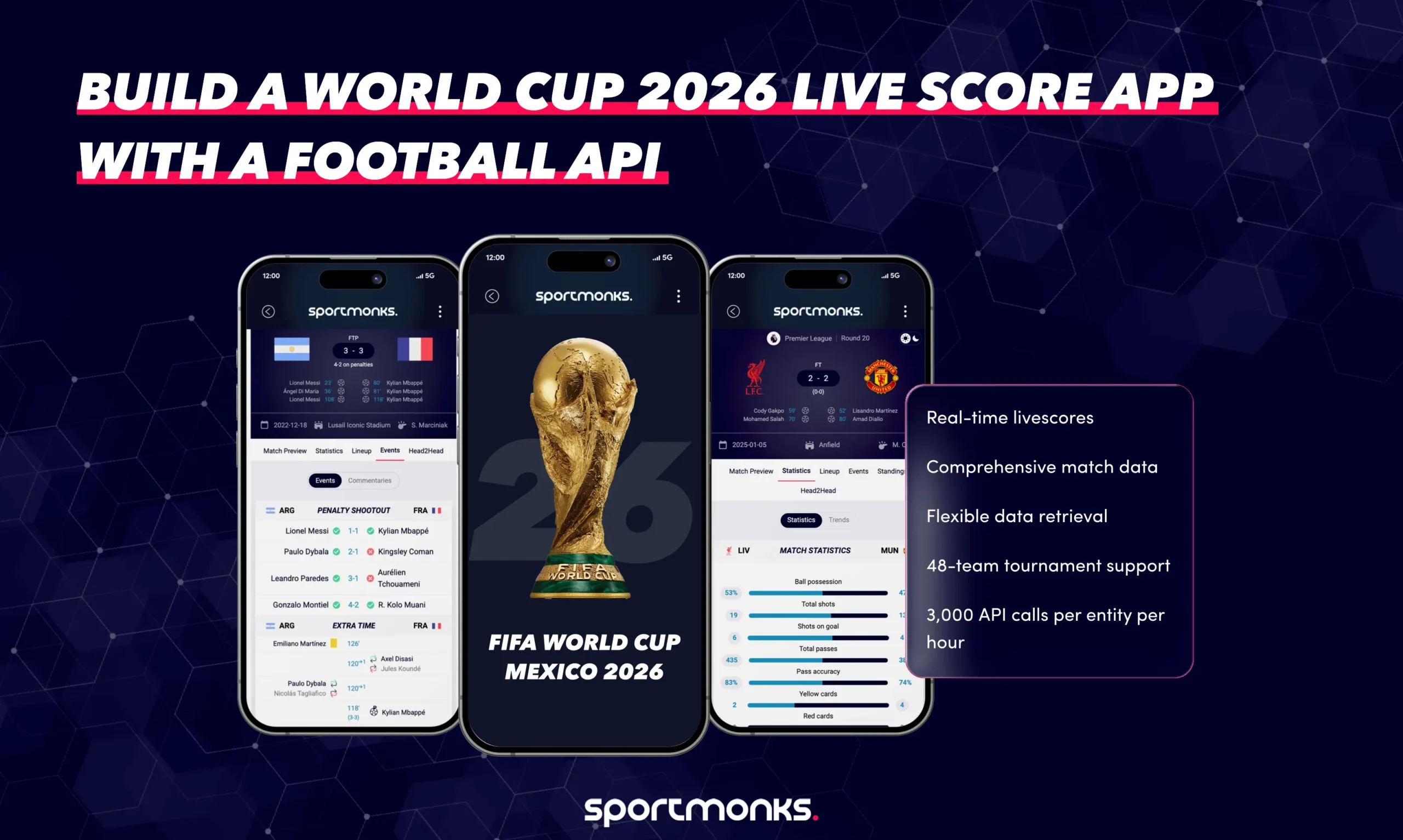
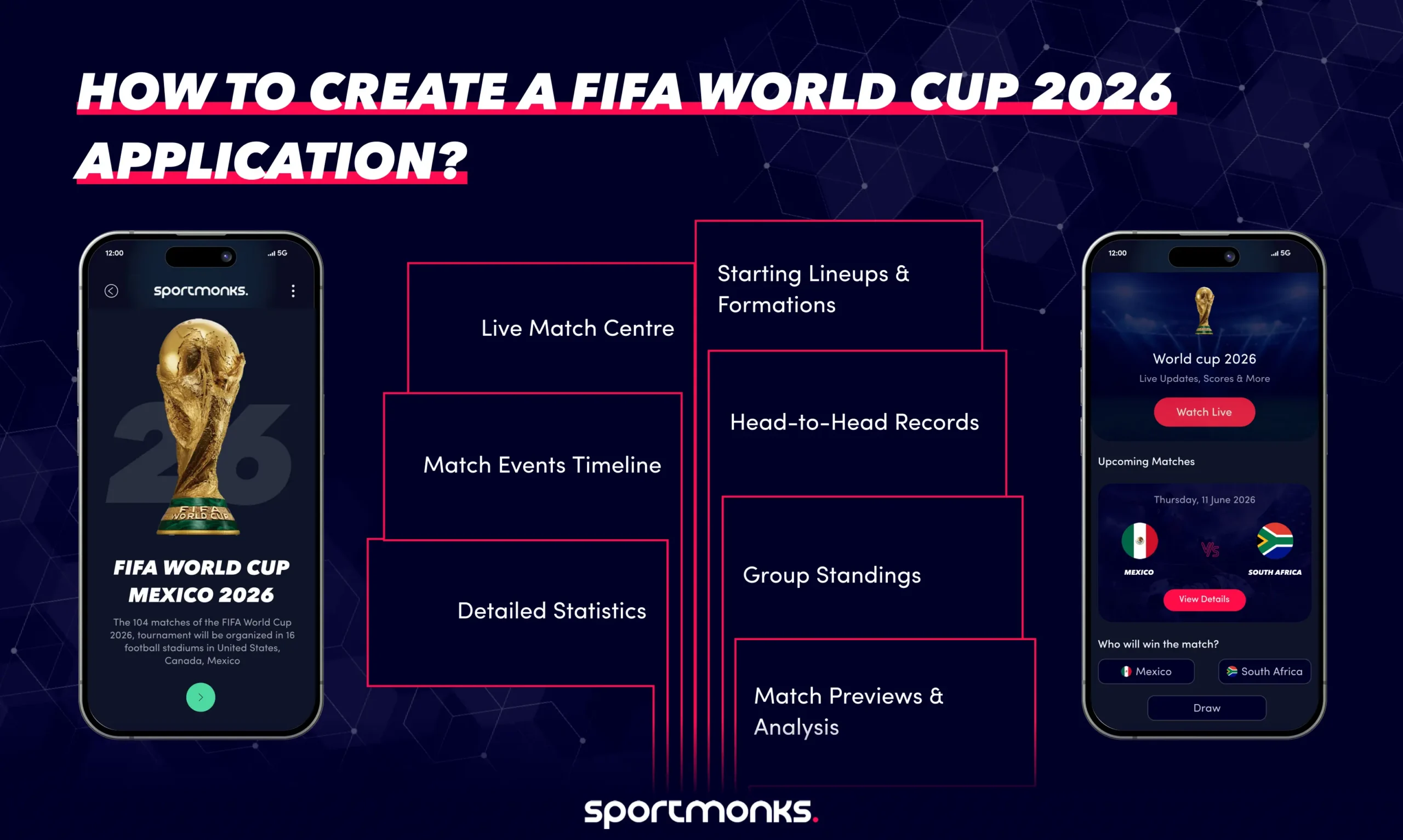
By the end of this guide, you’ll understand how to create a feature-rich World Cup application that includes:
– Live match centre with real-time scores and updates
– Match events timeline showing goals, cards, substitutions, and VAR decisions
– Detailed statistics for teams and players
– Starting lineups & formations with player details
– Head-to-head records between competing teams
– Group standings with live updates during matches
– Match previews & analysis using historical data
Prerequisites
Before you start building, you’ll need:
- Sportmonks API Account: Sign up at my.sportmonks.com and get your API token
- API Subscription: Ensure your plan includes World Cup 2026 coverage (Season ID: 26618)
- Development Environment: Basic knowledge of REST APIs and your preferred programming language
- Base URL: https://api.sportmonks.com/v3/football
Understanding the data structure
The Sportmonks API uses an includes system to enrich your responses with related data. Instead of making multiple API calls, you can request everything you need in a single request using the include parameter.
Key World Cup identifiers
– Season ID: 26618 (FIFA World Cup 2026)
– Group Stage ID: 77478590
– Round of 32 ID: 77479086
– Round of 16 ID: 77479087
– Quarter-finals ID: 77479088
– Semi-finals ID: 77479089
– Final ID: 77479090
Step 1: Building the match Centre
The match centre is the heart of your World Cup application. It displays live scores, match status, and quick access to detailed match information.
Fetching live matches
To get all live World Cup matches, use the /livescores/inplay endpoint with World Cup filters:
GET /v3/football/livescores/inplay
 ?api_token=YOUR_TOKEN
 &filters=fixtureSeasons:26618
 &include=participants,scores,state
This returns all currently in-play World Cup matches with:
participants: Team information (names, IDs, logos)
scores: Current score by period (HT, FT, current)
state: Match state (LIVE, HT, NS, FT)
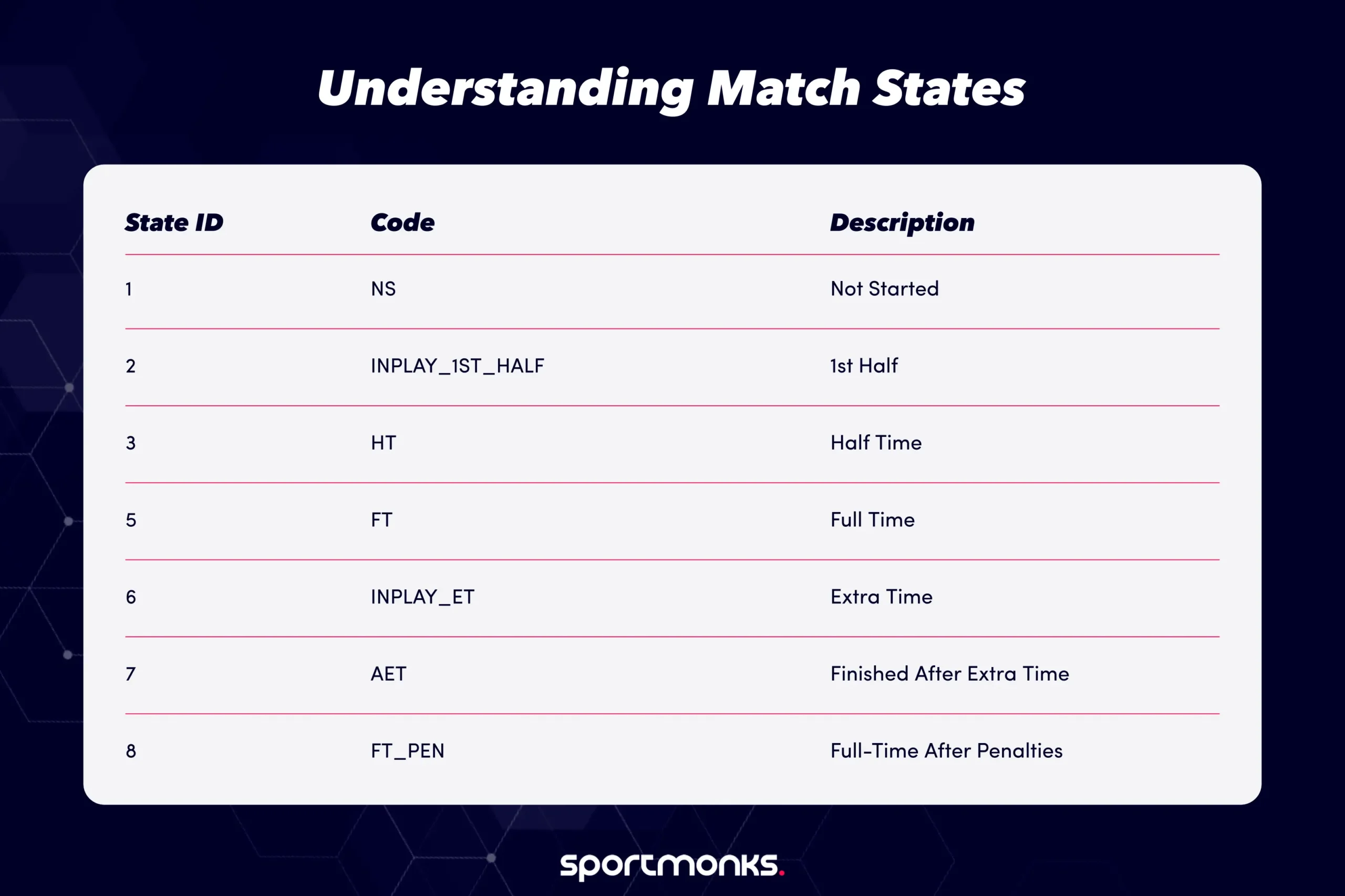
Understanding match states
The state_id field tells you the current status of each match:
Displaying scores
Scores are returned with descriptive types to help you understand when goals were
{
 "scores": [
   {
     "description": "CURRENT",
     "score": {
       "participant": "home",
       "goals": 2
     }
   },
   {
     "description": "1ST_HALF",
     "score": {
       "participant": "home",
       "goals": 1
     }
   }
 ]
}
Use the CURRENT indicator to always display the latest score, including any extra time.
Real-time updates
For efficient real-time updates, use the /fixtures/latest endpoint:
GET /v3/football/fixtures/latest
 ?api_token=YOUR_TOKEN
 &filters=fixtureSeasons:26618
 &include=participants,scores,state
This endpoint returns only fixtures that have been updated in the last 10 seconds, making it ideal for polling. Poll every 10-15 seconds during live matches to keep your match centre synchronised.
Pro Tip: Updates are typically delivered within 15 seconds of the actual event, often faster than live TV broadcasts.
Step 2: Implementing live match events
Match events provide the play-by-play action that makes your application engaging. Events include goals, cards, substitutions, VAR decisions, and more.
Fetching match events
To get all events for a specific match:
GET /v3/football/fixtures/{fixture_id}
 ?api_token=YOUR_TOKEN
 &include=events.player;events.type;events.subType
Event Types
The API provides comprehensive event coverage:
Scoring events:
– GOAL (ID: 14) – Regular goal
– OWNGOAL (ID: 15)- Own goal
– PENALTY (ID: 16) – Penalty scored
– MISSED_PENALTY – (ID: 17) – Penalty missed
– PENALTY_SHOOTOUT_GOAL (ID: 23) – Shootout penalty scored
– PENALTY_SHOOTOUT_MISS (ID: 22) – Shootout penalty missed
Card events:
– YELLOWCARD (ID: 19)- Yellow card
– REDCARD (ID: 20) – Direct red card
– YELLOWREDCARD (ID: 21) – Second yellow resulting in red
Substitution events:
– SUBSTITUTION (ID: 18) – Player substitution
VAR events:
– VAR_GOAL – VAR check for a goal
– VAR_CARD – VAR check for card
– VAR_PENALTY – VAR check for penalty
Event details & subtypes
For goals, use the subType include to get additional details:
?include=events.subType
SubTypes tell you how the goal was scored:
– Right foot
– Left foot
– Header
– Free kick
– Penalty
– Own goal
Displaying events timeline
Events include a minute field and an optional extra_minute for stoppage time:
{
 "events": [
   {
     "id": 85639443,
     "type_id": 14,
     "player_name": "Lionel Messi",
     "minute": 23,
     "extra_minute": null,
     "section": "event",
     "subtype": {
       "name": "Left Foot",
       "code": "leftfoot"
     }
   }
 ]
}
Events also include a sort_order field to help display multiple events of the same type in the correct chronological sequence.
Filtering specific events
If you only want specific event types (e.g., goals and cards), use filters:
?include=events
&filters=eventTypes:14,19,20
This returns only goals (14), yellow cards (19), and red cards (20), reducing response size.
Step 3: Adding match statistics
Statistics provide the depth that serious football fans crave. The Sportmonks API offers over 100+ different statistics types.
Fetching team statistics
Team-level statistics show overall match dynamics:
GET /v3/football/fixtures/{fixture_id}
 ?api_token=YOUR_TOKEN
 &include=statistics.type
Common team statistics
Shooting
– Ball possession percentage
– Shots total
– Shots on goal
– Shots off goal
– Shots blocked
– Shots inside the box
– Shots outside the box
Passing
– Passes total
– Passes accurate
– Pass accuracy percentage
– Key passes
– Crosses total
– Crosses accurate
Defending
– Tackles
– Interceptions
– Blocks
– Clearances
– Offsides
Discipline
– Fouls committed
– Yellow cards
– Red cards
– Penalties conceded
Set pieces
– Corners
– Free kicks
– Throw-ins
Understanding statistics structure
Statistics are returned with a type object that describes what the stat represents:
{
 "statistics": [
   {
     "data": {
       "value": 58,
       "participant_id": 1,
       "type_id": 42
     },
     "type": {
       "id": 42,
       "name": "Ball Possession",
       "code": "ball-possession",
       "developer_name": "BALL_POSSESSION"
     }
   }
 ]
}
Filtering specific statistics
To reduce response size, filter only the statistics you need:
?include=statistics.type

&filters=statisticTypes:45,86,80
This returns only possession (45), shots on goal (86), and passes (80).
Advanced statistics: Expected goals (xG)
For subscribers with xG packages, access Expected Goals data:
GET /v3/football/expected/fixtures
 ?api_token=YOUR_TOKEN
 &filters=fixtureSeasons:26618
xG values update continuously during matches (every couple of minutes, with a maximum 5-minute interval), providing insights into which team should be ahead based on shot quality.
Step 4: Displaying lineups & formations
Lineups and formations help fans understand team tactics and player positioning.
Fetching lineups
GET /v3/football/fixtures/{fixture_id}

 ?api_token=YOUR_TOKEN

 &include=lineups.player;lineups.details.type;formations;metadata
Lineup data structure
Lineups include:
– Starting XI: Players in the starting lineup
– Substitutes: Players on the bench
– Formation: Tactical formation (e.g., 4-3-3, 4-4-2)
– Player details: Position, jersey number, captain status
– Player statistics: Individual player stats for the match
{
 "lineups": [
   {
     "player_id": 96426,
     "player_name": "Lionel Messi",
     "team_id": 1,
     "position_id": 27,
     "formation_position": 11,
     "jersey_number": 10,
     "captain": true,
     "details": [
       {
         "type": {
           "name": "Shots",
           "code": "shots-total"
         },
         "value": {
           "total": 5,
           "on_goal": 3
         }
       }
     ]
   }
 ]
}
Understanding formation positions
Players have formation_position numbers that indicate their position in the formation:
– Position 1: Goalkeeper
– Positions 2-5: Defenders (typically)
– Positions 6-8: Midfielders (typically)
– Positions 9-11: Forwards (typically)
The exact positioning depends on the formation. Use the formations include to get the team’s tactical setup.
Displaying formations
The formations include provides the formation string (e.g., “4-3-3”):
?include=formations;metadata
Metadata, such as team colors, provides additional context, allowing you to render lineups with proper team branding.
Expected lineups (Pre-Match)
For pre-match predictions of starting lineups:
GET /v3/football/expected-lineups/teams/{team_id}

 ?api_token=YOUR_TOKEN

 &include=fixture;expected
Expected lineups are available hours before official announcements, with accuracy rates of:

Step 5: Creating a detailed match page
A comprehensive match page combines all the elements above into a single view.
Complete match page request
Here’s a comprehensive request that fetches everything for a detailed match page:
GET /v3/football/fixtures/{fixture_id}
 ?api_token=YOUR_TOKEN
 &include=participants;scores;state;venue;
          events.player.type;
          statistics.type;
          lineups.player;lineups.details.type;
          formations;metadata;periods;referees
This single request provides:
– Team information
– Current scores
– Match state
– Venue details
– All match events with player details
– Team and player statistics
– Complete lineups with formations
– Match officials
– Period timing information
Match page sections
Match header
– Team names and logos
– Current score
– Match state and time.
– Venue information
Match timeline
– Chronological list of all events
– Goals with scorers and assists.
– Cards with player names
– Substitutions with time stamps
– VAR decision.
Statistics dashboard
– Possession comparison
– Shots comparison
– Pass accuracy
Lineups & formations
– Visual formation display
– Player names and numbers
– Player statistics
– Substitutes bench
Match info
– Referee details
– Weather conditions
– Attendance (post-match)
Step 6: Building group Standings
Group standings are essential during the group stage of the World Cup.
Fetching standings
GET /v3/football/standings/seasons/26618
 ?api_token=YOUR_TOKEN
 &include=participant;details;form
Live standings
During matches, use live standings to show the virtual table:
GET /v3/football/standings/live/leagues/{league_id}
 ?api_token=YOUR_TOKEN
Live standings update in real-time to show how the table would look if current scores hold.
Standings data
Standings include:
– Position
– Team name
– Played
– Won/Drawn/Lost
– Goals for/against
– Goal difference
– Points
– Recent form (W-D-L-W-D)
Step 7: Adding head-to-head records
Head-to-head data provides historical context for upcoming matches.
Fetching H2H data
GET /v3/football/fixtures/head-to-head/{team1_id}/{team2_id}
 ?api_token=YOUR_TOKEN
 &include=scores;participants
Using H2H data
Display:
– Total matches played between teams.
– Wins for each team
– Recent results
– Average goals scored
– Historical World Cup encounters (if any)
You can even include statistics and lineups in H2H requests for deeper analysis:
?include=scores;participants;statistics.type;lineups
Step 8: Optimising performance
Caching strategy
Cache Static Data (cache for hours/days):
– Team information (names, logos, IDs)
– Venue details
– Season structure (stages, groups)
– Player profiles
Cache Dynamic Data (cache for 5-15 minutes):
– Upcoming fixtures
– Season standings
– Team squads
Never Cache (always fetch fresh):
– Live scores
– In-play events
– Live statistics
– Live standings
Efficient polling
For live matches:
-Poll /fixtures/latest every 10-15 seconds
– Only request includes you’re displaying.
– Use filters to reduce response size.
For match lists:
– Poll /livescores/inplay every 30-60 seconds
– Cache fixture lists and only update changed matches.
Rate limit management
– Standard plans: 3,000 requests per entity per hour
– Monitor the rate_limit object in responses.
– Implement exponential backoff for 429 errors.
– Spread requests across multiple entities when possible.
Field selection
Reduce bandwidth by selecting only needed fields:
?select=id,name,starting_at,result_info,state_id

&include=scores;participants
Step 9: Building the User Interface
Recommended UI Components
Dashboard/Home Screen
– Upcoming matches (today and tomorrow)
– Live matches with quick scores
– Recent results
– Group standings
Match centre
– List of all World Cup fixtures
– Filter by date, group, or knockout stage
– Search by team name
Live match page
– Real-time score updates
– Event timeline
– Statistics visualisation
– Live commentary
Team pages
– Squad list
– Team statistics
– Upcoming fixtures
– Historical performance
Groups & standings
– All groups displayed
– Real-time standings updates
– Qualification scenarios
– Goal difference sorting
Mobile considerations
– Implement pull-to-refresh for live data.
– Use push notifications for goal alerts.
– Optimise images (compress team logos)
– Implement offline mode for cached data.
Example: Complete Implementation
Here’s a complete workflow for a live match page:
1. Initial page load
// Fetch complete match data
const response = await fetch(
 `https://api.sportmonks.com/v3/football/fixtures/${fixtureId}` +
 `?api_token=${token}` +
 `&include=participants;scores;state;venue;` +
 `events.player;events.type;` +
 `statistics.type;` +
 `lineups.player;lineups.details.type;` +
 `formations;metadata;periods;referees`
);

const matchData = await response.json();
renderMatchPage(matchData);
2. Live updates loop
// Poll for updates every 10 seconds during live matches
if (matchData.data.state_id === 2) { // LIVE state
 setInterval(async () => {
   const updates = await fetch(
     `https://api.sportmonks.com/v3/football/fixtures/${fixtureId}` +
     `?api_token=${token}` +
     `&include=scores;events;statistics.type`
   );

   const newData = await updates.json();
   updateMatchPage(newData);
 }, 10000); // 10 seconds
}
3. Render match timeline
function renderTimeline(events) {
 const timeline = events
   .sort((a, b) => a.minute - b.minute)
   .map(event => {
     const icon = getEventIcon(event.type_id);
     const time = event.extra_minute
       ? `${event.minute}+${event.extra_minute}'`
       : `${event.minute}'`;

     return `
       <div class="event">
         <span class="time">${time}</span>
         <span class="icon">${icon}</span>
         <span class="description">
           ${event.player_name} ${getEventDescription(event)}
         </span>
       </div>
     `;
   });

 return timeline.join('');
}
4. Display statistics
function renderStatistics(statistics) {
 const stats = {
   home: {},
   away: {}
 };

 statistics.forEach(stat => {
   const side = stat.data.participant_id === homeTeamId ? 'home' : 'away';
   stats[side][stat.type.code] = stat.data.value;
 });

 return `
   <div class="stats-comparison">
     <div class="stat-row">
       <span class="home">${stats.home['ball-possession']}%</span>
       <span class="label">Possession</span>
       <span class="away">${stats.away['ball-possession']}%</span>
     </div>
     <div class="stat-row">
       <span class="home">${stats.home['shots-total']}</span>
       <span class="label">Shots</span>
       <span class="away">${stats.away['shots-total']}</span>
     </div>
   </div>
 `;
}
Testing your application
Test with past World Cup matches
Use historical World Cup data to test your application before the 2026 tournament:
GET /fixtures?filters=fixtureSeasons:19734 // World Cup 2022
Monitor performance
Track key metrics:
– API response times
– Number of requests per minute
– Cache hit rates
– User engagement with live features
Handle edge cases
Test for:
– Postponed matches
– Abandoned matches
– Matches with extra time
– Penalty shootouts
– Multiple substitutions at once
– VAR decisions that change the score
Best practices summary
– Use /fixtures/latest for efficient live updates
– Filter by season ID 26618 for all World Cup queries
– Include only the data you’re displaying
– Cache static data aggressively
– Implement exponential backoff for rate limit errors
– Use nested includes to reduce API calls
– Monitor API usage with the usage insights endpoint
– Test with historical World Cup data first
– Display events in chronological order using sort_order
– Show live standings during group stage matches
Conclusion
Building a FIFA World Cup 2026 application with the Sportmonks API gives you access to professional-grade football data trusted by media outlets, betting platforms, and sports apps worldwide. The API’s flexibility includes system, comprehensive event coverage, and real-time updates (often under 15 seconds), making it the perfect choice for World Cup applications.
By following this guide, you now have the knowledge to create a feature-rich application that includes:
– Real-time match centres with live scores and events
– Comprehensive statistics and player performance data
– Visual lineups and formations
– Historical head-to-head records
– Live group standings
– Match predictions and advanced analytics.
The key to success is understanding the API’s structure, using filters effectively, implementing smart caching, and respecting rate limits. Start building today, test thoroughly with historical data, and you’ll be ready to deliver an outstanding experience when the World Cup 2026 kicks off!
Additional resources
– Full API Documentation: docs.sportmonks.com/v3
– ID Finder Tool: my.sportmonks.com/resources/id-finder
– Postman Collection: postman.sportmonks.com
– Support: [email protected]
– Community & Updates: Follow Sportmonks for API updates and new features
Ready to start building? Sign up for a free Sportmonks account and get your API token today. Your World Cup 2026 application awaits!
FAQs