
Contents
What is the Sportmonks Football API and why it matters
The Sportmonks Football API is a powerful, RESTful API designed to give developers access to comprehensive football data. This includes everything from live scores and match schedules to team line-ups, player statistics, and match events.
Key features and benefits
– Wide-ranging data coverage: You can access thousands of leagues around the world, with over 2,300 leagues referenced in the latest overview. This means your application can easily target both local and global audiences.
– Rich data types: Our API provides in-depth information beyond final scores:
Live events (goals, cards, substitutions) and detailed statistics.
Full team squads and formations.
Historical data and upcoming match schedules.
Metadata such as referee and coach statistics, and betting odds (depending on your plan).
– Developer friendly: Our documentation stresses simplicity, speed, and flexibility. You authenticate with a token, make standard HTTP requests to endpoints, and receive clear JSON responses. Crucially, our API supports “includes,” filters, and nested fields, so you request only the specific data you require.
– Built for scale and variety of use-cases: Our API is designed to support various applications, including live score apps, fantasy games, betting dashboards, and media sites.
– Versioning and evolution: Our API recently moved to version 3.0, which introduces new endpoints (for transfers, referees, and schedules) and improved data features (detailed positions, ball coordinates). Developers should ensure they are aware of the current version and plan for future upgrades.
Tip 1: Start with a clear sync strategy
When you first start working with the Sportmonks Football API, you need a smart plan for loading all your data and then keeping it up to date. This approach prevents you from fetching huge files repeatedly, keeps your database efficient, and helps you stay within your rate limits.
– Initial data load: Our “Best practices” guide suggests performing a lightweight bulk fetch by using filters=populate. This parameter temporarily disables heavy nested data (includes), allowing you to pull a large volume of core data quickly and efficiently.
– Incremental updates: After the initial load, you should switch to an incremental update strategy. The recommended method is using filters=idAfter:<lastID>. This tells the API to only send you records that have been created since the last ID you successfully received, which minimises traffic and load.
– Developer tip: Once all your historical data is loaded, shift your system into an update mode (either through continuous checking, known as “polling,” or through automated push notifications, known as “webhooks”). Regularly monitor your updates; if the amount of new data you are receiving drops significantly, you should check to see if your database is fully synchronised or if there’s a problem with the feed.
Tip 2: Use includes and select carefully to reduce payload size
When you first start working with the Sportmonks Football API, it’s tempting to ask for all the data (all nested objects and all fields) but this often backfires. Large data packages lead to slow responses, waste bandwidth, and increase the processing load on your system. The smart move is to use the API’s features for includes, filters, and selecting fields so you only ask for what you actually need.
How to optimise your request
– Use include and select: You use the &include= parameter to fetch related data (like events or statistics). You then use the select= parameter (or the shorthand inside include) to return only the fields you need from that related data (for example, player_name and minute).
– Use filters: You can use &filters= to limit the kind of nested records you fetch. For example, you can filter to get only goals or substitutions instead of every single event.
Practical example
Here’s how you might request data when you only need goal events and the minute of the event, along with the player names:
GET /v3/football/fixtures/{fixture_id}

?api_token=YOUR_TOKEN

&include=events:player_name,related_player_name,minute

&filters=eventTypes:18,14
This request tells our API: “Give me the fixture, include only the events entity, but within that entity, return only the fields player_name, related_player_name, and minute. Also, filter the results so I only get event types with IDs 18 or 14 (which might be goals and key substitutions).”
Why this matters
– Faster performance: Smaller JSON responses mean faster network transfer and quicker processing on your backend.
– Lower risk: You reduce the risk of hitting rate limits or timeouts because you avoid “bulk-everything” requests.
– Simpler handling: Your system receives only the necessary data, which makes it easier to cache, easier to index in your database, and easier to debug.
Developer tip
Before launching your full-scale application, map out exactly what data your user interface needs. For instance, if you only need “live match events (goals, cards, subs)” and don’t need full ball-coordinate data, craft your include, select, and filters around that specific requirement. You should also build an abstraction layer in your code that allows you to easily adjust these parameters for future changes
Tip 3: Leverage our documentation and developer tools from the start
When you begin working with the Sportmonks Football API, it’s easy to dive straight into writing code, but taking time early to explore our documentation and tools will save you time and headaches later.
Why this matters
– Reduces guesswork: You will know which endpoint to call, which parameters to use, and exactly what data to expect in return.
– Helps avoid simple errors: You can avoid basic mistakes like using the wrong URL or forgetting the API token, which can significantly slow down your development.
– Gives you confidence in your data architecture: Knowing how the JSON is structured means you can map it to your internal database models early, making the whole system more stable.
– Makes onboarding other developers easier: With clear documentation and code libraries, your team can ramp up faster.
Key tools and resources
– Getting started section: This explains the basic setup, including authentication (API token) and how to make REST requests.
– Quick start guide: This helps you make your first successful API call in minutes.
– Demo response files: These files allow you to model your database and front-end logic based on real-world data examples.
– Components in tutorials: These visual building blocks show you how a real request maps to the data fields in the JSON response.
– Best practices: The “Best practices | API 3.0” page gives key guidance for scalable and consistent usage.
Developer tip
Before building the entire application, spend an hour walking through our documentation and running some example API calls. Download or import the Postman collection and test a few core endpoints your app will need (e.g., fixtures, events, players). Make sure you fully understand parameters like include=, filters=, and page= and the structure of the responses. Finally, set up an API client layer in your code that wraps these calls. This will make it much easier to manage future changes, such as a new API version.
Tip 4: Choose the right plan and understand rate-limits
Before you launch your project with the Sportmonks Football API, you must take time to select a plan that matches your usage and to fully understand how the rate limits work. This planning is essential for stability and cost-efficiency.
Why understanding limits matters
Our documentation states that the default plan allows 3,000 API calls per entity per hour. The limit is tracked per “entity” (e.g., separate limits for “teams,” “fixtures,” and “players”), not globall
– If you hit the limit for a given entity, you will receive a 429 Too Many Requests error and have to wait until the hour resets.
– Misjudging your usage can lead to unnecessary delays or force you into expensive, sudden upgrades when your application grows.
– Designing your system with these constraints in mind ensures you avoid surprises in production.
Developer tip
– Estimate usage: Calculate how many calls you expect to make per hour across your core entities (fixtures, live events, players) when your application is under peak load. Choose a plan that gives you headroom above that estimate, especially if you plan to scale.
– Monitor in real-time: Build your system to monitor the headers or the meta part of every API response. The API returns fields like remaining and resets_in_seconds, allowing your system to detect when it is approaching a limit.
– Build fallback logic: If you receive a rate-limit error for a specific entity (like players), you should implement a fallback. For example, you might delay non-critical updates for that entity until the next window rather than let the error disrupt your whole application.
Tip 5: Build for real-time and incremental updates
When you are using the Sportmonks Football API for live match data, events, or rapidly changing statistics, it is crucial to design your system so it only pulls what’s new rather than re-fetching everything each time. This approach is key for efficiency and speed. Our best-practices documentation shows exactly how to do this: use filters=populate for your initial large load, then use filters=idAfter:<lastID> for incremental updates.
Why this matters
– Data freshness: You keep your data up to date for your users (live goals, cards, and substitutions) without unnecessary delays.
– Efficiency: You reduce the amount of internet data used, lower load times, and save on API usage by avoiding redundant fetching of data that hasn’t changed.
– Scalability: Your application can handle more users and traffic because you are not performing full data refreshes every time.
Developer tip
- Initial sync: Start by performing a one-time initial sync. Use filters=populate to get all the core data (fixtures, players) with minimal extra details. Then, record the highest ID you have received for each type of data.
- Incremental updates: After the initial sync, set up a continuous task (a loop or cron job) that runs at your chosen interval (for example, every minute). This task should request:
?filters=populate;idAfter:<lastKnownId> - Update logic: When new records are returned, store them and update your lastKnownId with the highest new ID you’ve received.
- Handling back-filled data: Since out-of-order IDs or back-filled data can occasionally occur, you should periodically run a full snapshot of your reference data (teams, players) to ensure you don’t miss any updates.
Tip 6: Filter the data to what your application really needs
Our API documentation stresses that you should filter out data you won’t use and select only the fields you need so that your responses are leaner and faster.
Why this matters
– Avoids heavy payloads: By using filtering and field selection, you reduce the size of your JSON responses. This means faster processing and lower bandwidth consumption.
– Reduces processing overhead: Your backend and frontend logic have fewer fields to parse, fewer unused objects to ignore, and less data to store.
– Keeps you performant under load: The lighter your request and response, the quicker you can update your user interface or database, which is vital for live-match scenarios.
– Helps you stay within rate limits and cost constraints: Fewer irrelevant calls and less data usage leads to a more cost-efficient system.
Developer tip
– List exact needs: Before writing your code, list the exact data your application uses. For example: “I only need fixture ID, start time, home and away teams, and the current score.”
– Use the API’s filters parameter: Use &filters= to narrow down the data. For example:&filters=eventTypes:18,14 This would only fetch events of type 18 and 14 (goals and substitutions) for a given match.
– Use the select parameter: Use &include=events:player_name,minute to include only the player_name and minute fields for each event.
– Select on nested entities: If you have nested data (for example, line-ups → players → country), use selection on those nested entities too. For example:&include=lineups.player:display_name,image_path;lineups.player.country:name
– Periodic review: Regularly check your requests as your product evolves. If you add a new feature (like “player nationality”), then add only the relevant field rather than blindly fetching the full player object.
Tip 7: Use structured data modelling on your side
When you pull data from the Sportmonks Football API, it comes in well-structured JSON with clearly defined data entities (fixtures, players, teams, events) and nested relationships. It is a smart move to mirror that structure in your own system. You should define internal data models or classes that reflect those API entities rather than just storing raw JSON everywhere.
Why this matters
– Clearer code and easier maintenance: When you have internal types like Fixture, Player, and Event, you and your team can easily understand what each piece of data means.
– Easier to handle version changes: If the API introduces a new field or changes its structure, you only have to update your mapping layer instead of chasing raw JSON across your entire code.
– Better performance and storage design: Knowing which fields you are using allows you to design your database structure accordingly. This helps you avoid wide tables full of unused fields.
– Improved data quality: When you model data types explicitly, you can add validation, default values, or transformation logic (for example, converting timestamps or handling missing information) in one central place.
Developer tip
– Define core entities: Start by listing the core entities your application uses (e.g., League, Season, Fixture, Team, Player, Event).
– Create types: For each entity, define a type (class or struct) with only the fields you care about initially. You can easily expand this later.
– Write an adapter: Write an adapter or mapping layer that takes the API JSON, converts it into your internal data types, and handles missing or extra fields gracefully.
– Database design: If you are using a database, design your tables so that static entities (like teams, players) are stored separately from dynamic ones (like live events). This makes updates and caching easier.
– Add unit tests: Add tests to ensure that if the API returns unexpected values, your system still works properly.
– Plan for migrations: Version your models with comments or migration scripts so that if you later need to add new fields (like “xG” or advanced metrics), you can do it smoothly.
Tip 8: Monitor API changes, versioning and compatibility
When working with the Sportmonks Football API, you can’t just build your application once and forget about it; APIs evolve, and you need to be prepared for changes. Our documentation shows that version 3.0 introduced new endpoints (such as transfers and referees) and updated data models compared with version 2.0.
Why this matters
– Risk of breakage: Some endpoints you rely on today may be deprecated in future versions, which could break your application or cause you to serve stale data.
– Refactoring: Changes to the data model (for example, how teams or players are represented) may force you to update your code or database structure.
– Missing features: If you ignore versioning, you risk missing out on new features (such as better statistics or faster endpoints) and falling behind your competitors.
Developer tip
– Subscribe to the changelog: Always monitor the Changelog section in the Sportmonks documentation for updates.
– Build an abstraction layer: In your codebase, create a clear layer specifically for API calls. If an endpoint or field name changes, you only need to adjust the code in this single layer, not across your entire application.
– Create automated tests: Set up automated tests or alerts that check for unexpected changes in the API responses (for example, new, unexpected keys or missing fields).
– Plan for transition: When moving from older versions (e.g., API 2.0) to newer ones, plan for a transition period. Sportmonks states that API 2.0 will remain active until at least the end of 2025.
– Document internal usage: Document within your team exactly which API version you are using (e.g., “v3.0”), when you plan to upgrade, and what key features you depend on that might change.
Tip 9: Cache static data, avoid redundant fetches and design efficient data updates
When using the Sportmonks Football API, not all data changes at the same speed. Many types of information are relatively static (team profiles, player biographies, venue details), while others change frequently (live scores, events). By recognising this and treating these data types differently, you can improve performance, cut down on unnecessary API usage, and build a more efficient system.
Why this matters
– Efficiency: Fetching static or rarely-changing data repeatedly wastes API calls and bandwidth, which can lead to unnecessary costs.
– Speed: Live data needs to be fresh, but you don’t want to block or slow your system with full data reloads every time you check for an update.
– Predictability: Your local database and cache become easier to manage when you separate “stable” data from “volatile” data. This makes updates simpler and faster.
Developer tip
– Cache static entities: When you fetch data for entities like teams, players, venues, or leagues, store them in your database or cache and treat them as reference data. Only update them if you detect a change (for example, by checking an updated_at field) rather than on every app refresh.
– Use incremental fetching for live data: For live match data (fixtures, events, live scores), implement incremental fetching. This means you only request new events (for example, using idAfter filters) rather than re-fetching the entire match record each time.
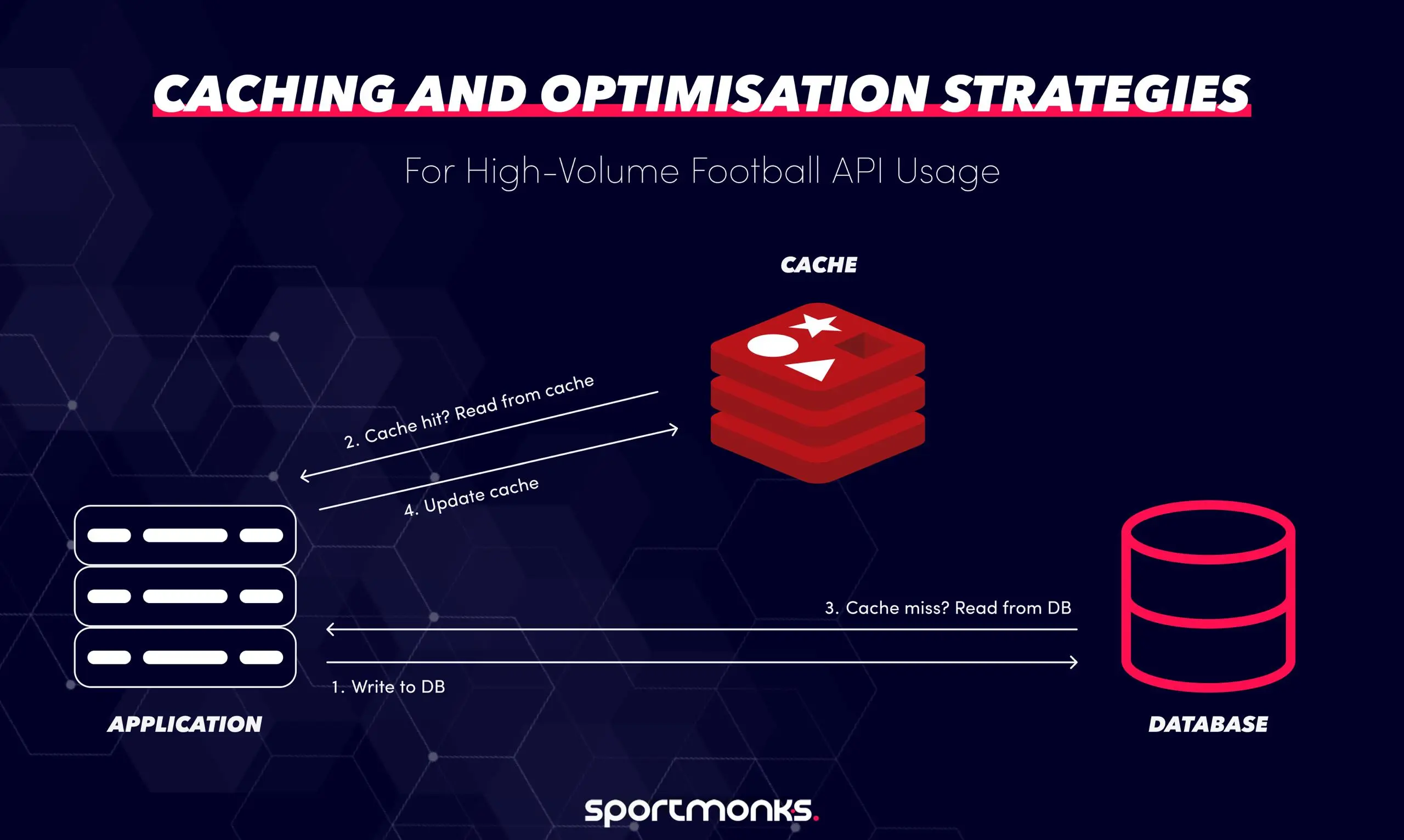
– Apply smart caching strategies: Use strategies like “cache-aside” (check cache first, then fetch from the API if missing) or “time-based expiry”. Static data can be safely set to expire after a day, while live data needs to be refreshed every few seconds.
– Compare payloads: For live feeds, compare the new data package with your cached version. If there are no actual changes, you can skip the processing and UI update, which prevents redundant work.
– Monitor and adjust: If you see many calls returning the same data (e.g., no events since the last check), consider reducing your polling frequency to save resources and avoid hitting rate limits unnecessarily.
Tip 10: Align API usage with your app’s core use-case
Before you pull in every endpoint and field offered by the Sportmonks Football API, take a moment to define the fundamental purpose of your application. The API’s data supports many use-cases, such as live score apps, fantasy football platforms, betting dashboards, and media websites. Matching your data usage to your core feature set keeps your system lean, your costs under control, and your user experience tight.
Why this matters
– Live scores: If your app’s main purpose is live scores, you should prioritise endpoints for live fixtures and events, not full player career histories.
– Fantasy football: If you’re building a fantasy product, you’ll need granular player statistics, form trends, and verified line-ups more than live event commentary.
– Media / editorial content: If your focus is on match previews or analysis, you may emphasise team and player profiles, head-to-head historical match data, and rich metadata.
– Efficiency: Matching usage to your needs prevents you from over-fetching unnecessary data, which saves bandwidth and reduces your API call count.
Developer tip
- Define core features: Define the top 2-3 features your application offers (e.g., “real-time live scores,” “top player performance tracking,” “betting odds and insights”).
- Map minimum data: For each of those core features, map out the minimum set of endpoints and fields you will need. For instance, a “live score” feature needs: fixture ID, start time, home/away teams, current score, minute, and goals/cards events.
- Build incrementally: Build your initial system around those essential features. Request only the endpoints you need and select only the required fields.
- Controlled evolution: As your product evolves (e.g., you decide to add “expected goals (xG) insights”), extend your API usage accordingly, rather than fetching everything “just in case” from the beginning.
- Review your usage: As you add features, make sure any increase in API calls or nested data is a conscious and controlled decision.
Build smarter football apps with the Sportmonks Football API
The Sportmonks Football API gives developers live scores, line-ups, odds, and stats from 2,300+ leagues worldwide, designed for flexibility, scale, and precision. With built-in filters, includes, and smart data control, you can fetch exactly what your app needs. Whether you’re building a live score app, fantasy platform, or betting product, Sportmonks helps you optimise performance, reduce bandwidth, and stay ahead with real-time football intelligence. Start your free trial today and turn raw football data into smarter, faster, and more efficient experiences.
Faqs about Sportmonks API